-01.svg)
-02.svg)
-03.svg)
-04.svg)
-05.svg)
-06.svg)
-07.svg)
-08.svg)
-09.svg)
-10.svg)
-11.svg)
-12.svg)
-13.svg)
-14.svg)





blog
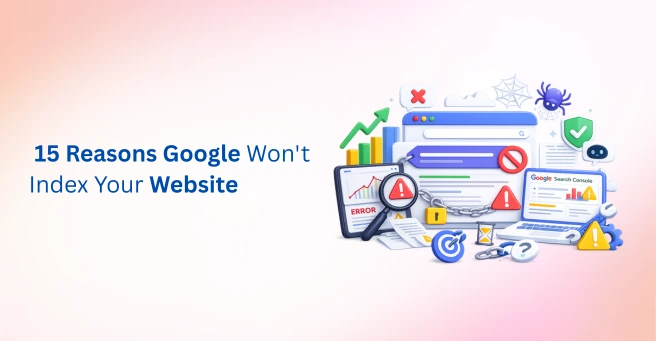
Why Google Is Not Indexing Your Pages: 15 Common Causes & Fixes
| Google usually isn’t indexing pages because of a noindex tag, robots.txt block, thin or duplicate content, missing internal links, canonical errors, or a crawl budget issue. Check Google Search Console’s Page Indexing report and the URL Inspection Tool to identify the exact cause, then fix technical blockers first before improving content quality. |
You just hit publish. The content is good, the page looks great, and by every measure it should be showing up on Google. So you wait a few days, open Google Search Console, and nothing. The page is sitting there, unindexed, invisible to anyone searching for it. If you have ever typed “why Google is not indexing pages” into a search bar at 11 PM out of pure frustration, you are in good company. This happens to brand-new blogs and established enterprise sites alike, and it’s rarely a sign that you’ve done something catastrophically wrong.
Here’s the reassuring part: indexing issues are one of the most common technical SEO problems out there, and also one of the most misunderstood. Site owners tend to assume the worst, that Google has flagged their site, or that they have been penalized, when in reality the cause is almost always something narrower and far more fixable. The tricky part isn’t fixing these issues; it’s figuring out which one (or two, or three) is actually responsible for your specific pages sitting unindexed.
That’s exactly what this guide is built to solve. We will walk through the 15 most common reasons why Google is not indexing pages, show you how to diagnose each one directly inside Google Search Console, and give you a clear order of operations for what to fix first.
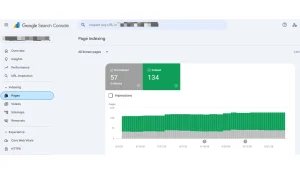
Image Source: Screenshot taken from Google Search Console.
What Does Google Not Indexing Pages Actually Mean?
Before troubleshooting why Google is not indexing pages, it helps to separate three concepts people often lump together: crawling, indexing, and ranking. Crawling is Googlebot visiting a URL. Indexing is Google storing and processing that page so it’s eligible to appear in Google Search. Ranking is where an indexed page shows up for a given query. A page can be crawled without ever being indexed, and understanding which stage is breaking down is the first real step toward a fix.
Google Search Console’s Page Indexing report groups non-indexed URLs into several statuses, and each one points to a different underlying problem:
| Search Console Status | What It Means | Typical Fix |
| Crawled – currently not indexed | Googlebot fetched the page but decided against indexing it, usually a content quality or relevance signal | Improve content depth, originality, and internal linking |
| Discovered – currently not indexed | Google knows the URL exists but hasn’t crawled it yet, often a crawl budget or priority issue | Strengthen internal links, submit an updated XML sitemap |
| Duplicate without user-selected canonical | Google found near-identical content and chose its own canonical instead of yours | Add explicit, self-referencing canonical tags |
| Page with redirect | The URL redirects elsewhere, so the original is excluded by design | Confirm the redirect is intentional and not a chain or loop |
Data point: Independent analysis of roughly 1.7 million pages by Indexing Insight found that 70-80% of URLs sitting under “crawled – currently not indexed” had actually been indexed by Google at some point before being quietly dropped, meaning many indexing issues are really re-indexing or content-decay problems rather than brand-new discovery problems.
How to Check If Your Pages Are Indexed
Start with the basics before diving into the 15 causes below. Run a site search using the site: search operator (site:yourdomain.com/page-url) directly in Google Search to see if the URL appears at all. Then open Google Search Console and check the Page Indexing report for the exact exclusion reason. Finally, paste the specific URL into the URL Inspection Tool, which gives you the most current, page-level view of crawl and index status, including whether Googlebot could access the page and which canonical it chose.
Tip: After fixing an individual issue, use the URL Inspection Tool to request indexing for that page rather than batch-resubmitting your whole sitemap. Fixing the root cause first means each request actually has a chance of succeeding.
Google Search Console’s Page Indexing report lists the exact reasons why pages are excluded from Google’s index, helping you prioritize the right fixes.
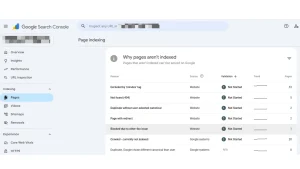
Image Source: Screenshot taken from Google Search Console.
15 Common Causes of Google Indexing Issues and How to Fix Them
Once you understand why pages are not indexing at a conceptual level, the next step is auditing your site against the specific causes below. Most sites are dealing with a combination of two or three of these, not just one.
| Sr No. | Cause |
| 1 | Noindex tag left on page |
| 2 | Blocked by robots.txt |
| 3 | Poor crawl budget allocation |
| 4 | Orphan pages |
| 5 | Thin content quality |
| 6 | Duplicate content, no canonical |
| 7 | Incorrect canonical tags |
| 8 | XML sitemap errors |
| 9 | Server errors on crawl |
| 10 | Soft 404 errors |
| 11 | Redirect errors / chains |
| 12 | New site or page authority |
| 13 | Page speed / Core Web Vitals |
| 14 | Manual actions / penalties |
| 15 | Weak backlinks / internal links |
1. A Noindex Tag Left on the Page
A meta robots noindex tag, or a noindex value in the X-Robots-Tag HTTP header, tells Google outright not to index a page. This often slips through after a staging-to-production migration. Check page source or crawl your site with a tool like Screaming Frog to catch stray noindex tags before they cost you visibility.
2. Pages Blocked by robots.txt
Your robots.txt file controls which sections of your site Googlebot is allowed to crawl. A single misplaced Disallow rule can silently block an entire folder. Test your robots.txt rules directly inside Google Search Console to confirm important pages aren’t accidentally blocked.
3. Poor Crawl Budget Allocation
Crawl budget is the number of URLs Googlebot is willing and able to crawl on your site within a given timeframe. It matters most for large sites or those that publish frequently. If Googlebot is spending its budget crawling parameter URLs, filtered category pages, or thin auto-generated content, your important pages may get discovered late or not at all.
4. Orphan Pages With No Internal Links
Orphan pages have no internal links pointing to them, which makes page discovery difficult even after Google is aware a page exists. Website architecture matters here: every important page should be reachable within a few clicks from your homepage or a well-linked hub page.
5. Weak or Thin Content Quality
Content quality is now one of the single biggest reasons why pages are not indexing. Google’s May 2025 quality systems update specifically deprioritized pages that restate widely available information without adding original analysis, data, or first-hand experience. If your page doesn’t clearly demonstrate E-E-A-T – experience, expertise, authoritativeness, and trust, it’s competing against pages that do, and losing.
6. Duplicate Content Without Canonical Signals
When multiple URLs serve near-identical content, such as filtered, sorted, or session-based variations of the same page, Google may decide none of them deserve a spot in the index, or it may pick a canonical you didn’t intend.
7. Incorrect or Missing Canonical Tags
Canonical tags should point to the single, preferred version of a page. Self-referencing canonicals on unique pages, and correct cross-page canonicals on true duplicates, prevent Google from making that decision for you.
8. XML Sitemap Errors or a Missing Sitemap
Your XML sitemap is one of the clearest discovery signals you can give Google. A sitemap full of broken links, non-canonical URLs, or outdated entries actively works against page discovery. Keep it clean, current, and submitted through Google Search Console.
9. Server Errors During Crawl Attempts
If Googlebot repeatedly hits 5xx server errors when trying to fetch a page, it will eventually stop trying. Recurring server errors are a red flag worth checking in your hosting logs and in the Crawl Stats report.
10. Soft 404 Errors
A soft 404 happens when a page returns a normal 200 status code but the content looks empty, broken, or like an error page to Google. Thin category pages, empty search-result pages, and out-of-stock product pages are common culprits.
11. Redirect Errors and Redirect Chains
Multiple hops between redirects, redirect loops, or redirects that resolve to unrelated content all interfere with indexing. Keep redirects to a single, direct hop wherever possible.
12. New Site or New Page Authority Issues
Brand-new sites and pages sometimes simply need time. Google needs to discover, crawl, and evaluate a page against your site’s overall trust signals before deciding to index it.
13. Slow Page Speed or Core Web Vitals Issues
While page speed is more directly tied to ranking than indexing, severely slow-loading or render-blocked pages can cause crawl timeouts, which indirectly affects whether Googlebot fully processes the page content.
14. Manual Actions or Algorithmic Penalties
Check the Security & Manual Actions report in Google Search Console. A manual action or a significant algorithmic quality drop can result in large sections of a site being excluded from the index.
15. Weak External Signals and Low-Quality Backlink Profile
Pages that exist in isolation, with no internal links and no external signals pointing to them, give Google very little reason to prioritize crawling or indexing them over the millions of other pages competing for the same crawl and index resources.
How to Fix Google Indexing Issues: A Step-by-Step Checklist
Once you’ve identified which of the 15 causes apply to your site, work through fixes in this order to resolve Google indexing issues efficiently:
- Remove accidental noindex tags and confirm robots.txt isn’t blocking important sections
- Fix broken, chained, or looping redirects
- Resolve server errors and soft 404s flagged in Search Console
- Set clear, self-referencing canonical tags across the site
- Clean up and resubmit your XML sitemap
- Strengthen internal linking to eliminate orphan pages
- Improve content depth, originality, and E-E-A-T signals on thin pages
- Monitor the Page Indexing report weekly and request indexing for individually fixed URLs
Tools to Diagnose and Prevent Indexing Problems
| Tool | Best For | Cost |
| Google Search Console | Official page indexing report and URL Inspection Tool | Free |
| Screaming Frog | Site-wide crawlability and technical SEO audits | Free / Paid tiers |
| Log file analyzer | Seeing exactly how Googlebot crawls your site | Paid |
Best Practices to Prevent Future Indexing Problems
- Keep your XML sitemap accurate and limited to canonical, indexable URLs
- Maintain a clear website architecture with strong internal linking
- Run technical SEO audits on a regular schedule, not just when traffic drops
- Check the Page Indexing report in Google Search Console weekly
- Avoid publishing duplicate or near-duplicate content at scale
- Build genuine E-E-A-T signals: author bios, original data, cited sources, and demonstrated expertise
Final Thoughts
Indexing issues rarely announce themselves loudly. A page sits quietly unindexed while it should be earning organic traffic, and the underlying cause is often a small technical detail or a content quality gap rather than anything dramatic. Understanding why Google is not indexing pages on your site, and treating it as an ongoing part of website health rather than a one-time fix, is what separates sites that recover quickly from sites that keep losing visibility to the same recurring problems.
If auditing 15 different potential causes across your site sounds like more than your team has bandwidth for, that’s exactly the kind of work Tangence handles for clients every day. As an end-to-end digital marketing and SEO services agency with over two decades of experience in technical SEO, AEO, and GEO, Tangence runs complete indexing and crawlability audits, fixes canonical and sitemap errors, rebuilds internal linking and website architecture, and helps brands turn indexing fixes into measurable organic traffic gains. If your pages aren’t showing up in Google Search the way they should, Tangence’s SEO expert team can help you find out exactly why, and fix it.
Frequently Asked Questions
1. Why is Google not indexing my page even after I submit it in Search Console?
Submitting a URL in Google Search Console only requests a crawl. it doesn’t guarantee indexing. Before adding a page to its index, Google evaluates content quality, originality, technical SEO, and user value. Therefore, fix issues such as thin content, duplicate pages, or a noindex tag before requesting indexing again.
2. What’s the difference between “crawled – currently not indexed” and “discovered – currently not indexed”?
Although both statuses indicate that a page isn’t indexed, they represent different stages. “Discovered – currently not indexed” means Google knows the URL exists but hasn’t crawled it yet. In contrast, “Crawled – currently not indexed” means Google visited the page but decided not to index it, usually because of quality or relevance concerns.
3. How long does it take for Google to index a new page?
Google may index a new page within a few hours or take several weeks. The timeline depends on factors such as your site’s authority, crawl frequency, internal linking, XML sitemap, and overall technical health. Strong optimization usually speeds up the process.
4. Can duplicate content stop Google from indexing my pages?
Yes. When Google finds multiple pages with nearly identical content, it often indexes only one version. To prevent this, use canonical tags, consolidate duplicate URLs, and publish original, high-quality content.
5. Does crawl budget matter for small websites?
Generally, crawl budget isn’t a major concern for small websites. However, poor internal linking, orphan pages, duplicate URLs, or unnecessary parameter pages can still delay page discovery. Therefore, maintain a clean site structure and an updated XML sitemap.
6. How do I fix a “page with redirect” indexing issue?
First, confirm whether the redirect is intentional. If it is, no action is usually required. However, if the redirect is accidental, remove or correct it so Google can crawl and index the intended page. Also, avoid redirect chains and loops.
7. Will a noindex tag permanently remove my page from Google Search?
No. A noindex tag doesn’t permanently remove your page. After removing it, request a re-crawl using the URL Inspection Tool in Google Search Console. If the page meets Google’s quality and technical requirements, Google can index it again within a few days or weeks.