-01.svg)
-02.svg)
-03.svg)
-04.svg)
-05.svg)
-06.svg)
-07.svg)
-08.svg)
-09.svg)
-10.svg)
-11.svg)
-12.svg)
-13.svg)
-14.svg)






blog
What Are Core Web Vitals? Common Website Issues That Cost You Rankings

| Core web vitals are three Google-defined performance metrics – Largest Contentful Paint (LCP), Interaction to Next Paint (INP), and Cumulative Layout Shift (CLS) that measure real-world page experience in terms of loading speed, interactivity, and visual stability. Introduced in 2020 and made an official ranking factor in 2021, core web vitals directly influence a website’s search rankings and organic traffic. |
Did you know a one-second delay in page load time can reduce conversions by up to 7%? Or that 53% of mobile users abandon a website if it takes more than three seconds to load? These numbers reveal a hard truth, your website’s performance is not just a technical concern. It is a direct business metric.
So, what are core web vitals, and why does every SEO professional talk about them? Core web vitals are a set of specific, measurable signals that Google uses to evaluate the real-world page experience your website delivers. They sit at the intersection of technical SEO and user experience and since 2021, they have been an official Google ranking factor.
In this guide, you will get a complete, jargon-free breakdown of all three core web vitals metrics. You will learn how to check core web vitals using free tools, identify the most common issues pulling down your scores, and apply practical fixes that improve both your website performance and your search rankings.
What Are Core Web Vitals?
Core web vitals are three user-centric performance metrics that Google introduced in 2020 and made an official ranking signal in 2021. They form part of a broader set of page experience signals, alongside HTTPS security, mobile-friendliness, and the absence of intrusive interstitials.
What makes core web vitals different from older speed metrics is their focus on how users actually experience a page and not just how fast it loads in a controlled test environment. Google collects this data from real Chrome users through the Chrome User Experience Report (CrUX) and uses it to assess your website’s performance in the real world.
Understanding core web vitals is no longer optional for businesses serious about SEO. According to Google, pages that meet the core web vitals thresholds are 24% less likely to see users abandon the page mid-load. That directly impacts dwell time, bounce rate, and ultimately, your search rankings.
The three core web vitals metrics are:
- Largest Contentful Paint (LCP):- measures loading performance
- Interaction to Next Paint (INP):- measures interactivity and page responsiveness
- Cumulative Layout Shift (CLS):- measures visual stability
The Three Core Web Vitals Metrics Explained
This guide breaks down each metric in detail, what it measures, why it matters, what causes poor scores, and how to fix it.
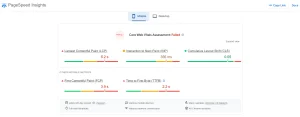
Image Source: Screenshot taken from Google’s Page Speed Insights.
1. Largest Contentful Paint (LCP)
Largest contentful paint measures how long it takes for the largest visible element on the page, typically a hero image, above-the-fold heading, or video thumbnail to fully load and render on the screen.
LCP represents what users perceive as the page ‘being ready’. A slow LCP means users are staring at a blank or partially loaded screen, which drives up bounce rates and signals poor website speed to Google.
LCP Score Thresholds:
- Good: Under 2.5 seconds
- Needs Improvement: 5 to 4.0 seconds
- Poor: Over 4.0 seconds
Common causes of poor LCP:
- Large, uncompressed images served in outdated formats (JPEG, PNG instead of WebP)
- Render-blocking JavaScript or CSS in the document head
- Slow server response time – high Time to First Byte (TTFB)
- No Content Delivery Network (CDN) being used
- Client-side rendering without server-side caching
How to improve LCP:
- Convert images to WebP or AVIF format and compress them before uploading
- Add a <link rel=’preload’> tag for your hero image or LCP element
- Eliminate render-blocking resources by deferring non-critical JavaScript
- Enable server-side caching and upgrade to a faster hosting plan
- Use a CDN to serve assets from a server geographically closer to the user
2. Interaction to Next Paint (INP)
Interaction to next paint measures how quickly your page responds to all user interactions, clicks, taps, and keyboard inputs. It was officially introduced to replace First Input Delay (FID) in March 2024, making it one of the most important updates to the core web vitals framework in recent years.
Unlike FID, which only measured the delay before the browser began processing the first interaction, INP captures the full latency of every interaction throughout the page lifecycle. A page with poor INP feels sluggish and unresponsive even if it loaded quickly.
INP Score Thresholds:
- Good: Under 200 milliseconds
- Needs Improvement: 200 to 500 milliseconds
- Poor: Over 500 milliseconds
Common causes of poor INP:
- Heavy JavaScript execution blocking the browser’s main thread
- Long tasks (over 50ms) preventing timely response to user input
- Excessive third-party scripts, analytics, chat widgets, ad tags
- Poorly optimised event handlers firing too much work on each interaction
How to fix INP issues:
- Break up long JavaScript tasks into smaller, yielding chunks
- Defer non-critical scripts and load third-party tags asynchronously
- Audit and remove unnecessary third-party plugins and widgets
- Use a web worker for computationally heavy tasks to free the main thread
- Minimise DOM size, large DOMs increase the work done on each interaction
3. Cumulative Layout Shift (CLS)
Cumulative layout shift measures how much the visible content of a page shifts unexpectedly during and after loading. Have you ever gone to click a button and had it jump just as your finger touched the screen? That is a layout shift and it is one of the most frustrating user experience problems on the modern web.
CLS is calculated as a score based on the impact fraction (how much of the viewport shifted) multiplied by the distance fraction (how far elements moved). A high CLS score signals visual instability to Google and directly harms engagement metrics.
CLS Score Thresholds:
- Good: Under 0.1
- Needs Improvement: 1 to 0.25
- Poor: Over 0.25
Common causes of poor CLS:
- Images and videos without declared width and height attributes
- Dynamically injected content like ads, banners, cookie notices, pushing content down
- Web fonts that cause a Flash of Unstyled Text (FOUT) and reflow on load
- Embeds (iframes, social widgets) without reserved space
How to fix CLS issues:
- Always define width and height on all image and video elements
- Use the CSS aspect-ratio property for responsive media containers
- Reserve space for dynamic content (ads, banners) with a minimum height placeholder
- Use font-display: optional or font-display: swap with fallback fonts sized to match
- Avoid inserting content above existing content after the page has loaded
Why Core Web Vitals Matter for SEO and Organic Traffic
Many website owners treat core web vitals as a purely technical box-ticking exercise. That is a costly mistake. These metrics sit at the heart of Google’s page experience ranking system and their impact on organic traffic is both direct and compounding.
1. They are a confirmed Google ranking factor.
Since the page experience update rolled out in 2021, core web vitals have been among the signals Google uses to rank pages. Websites that consistently score ‘Good’ on all three metrics have a measurable advantage, particularly in competitive search verticals where content quality is similar across top-ranking pages.
2. Poor scores increase bounce rate and reduce dwell time.
A slow LCP means users leave before the page loads. A high INP means users give up on interactive elements. A poor CLS score causes accidental clicks and frustration. Each of these outcomes reduces the engagement signals that Google uses as quality indicators.
3. Google’s assessment is mobile-first.
Core web vitals are primarily evaluated on mobile devices. With mobile-first indexing now standard across Google Search, a site that passes on desktop but fails on mobile is still at risk. Mobile optimisation is no longer a nice-to-have, it is foundational to technical SEO in 2024 and beyond.
4. CWV performance affects paid search quality too.
Page responsiveness and website speed influence Google Ads Quality Scores. A better Quality Score means lower cost-per-click and better ad placements. Improving your core web vitals performance metrics does not just help your SEO, it makes your paid campaigns more cost-efficient.
How to Check Core Web Vitals
Before you can fix anything, you need to know where you stand. A complete technical SEO audit can uncover performance issues beyond Core Web Vitals. Here are the four best free tools to check your core web vitals scores, each offering a different level of insight.
| Tool | Best For | Data Type |
|---|---|---|
| Google Search Console | Site-wide monitoring | Field Data |
| PageSpeed Insights | URL diagnostics | Field + Lab Data |
| Lighthouse | Testing before deployment | Lab Data |
| Web Vitals Extension | Real-time monitoring | Live Browser Data |
Common Core Web Vitals Issues That Are Costing You Rankings
Most websites fail their core web vitals for predictable, fixable reasons. Here are the five most common issues and what to do about each one.
Issue 1: Unoptimised Images
Images are the largest assets on most web pages and they are the single most common cause of poor LCP scores. Oversized images served in outdated formats like PNG or JPEG force the browser to download massive files before rendering the page.
Fix: Convert all images to WebP format. Compress images before uploading. Implement lazy loading for all below-the-fold images. Set explicit width and height on every image element.
Issue 2: Render-Blocking JavaScript and CSS
When JavaScript or CSS is loaded synchronously in the document head, the browser cannot render any content until those files are fully downloaded and parsed. This directly delays LCP and can also increase INP by adding work to the main thread early in the page lifecycle.
Fix: Add defer or async attributes to non-critical JavaScript files. Inline critical CSS directly in the head. Move non-essential stylesheets to load after the main content.
Issue 3: Images and Videos Without Declared Dimensions
When the browser does not know the size of an image or video before it loads, it cannot reserve the correct amount of space in the layout. The result is a layout shift as the element loads and pushes other content around, directly increasing your CLS score.
Fix: Always include width and height attributes on all img and video elements. Use the CSS aspect-ratio property to maintain proportions on responsive layouts.
Issue 4: Slow Server Response Time (High TTFB)
Time to First Byte (TTFB) is the time it takes for the browser to receive the first byte of data from the server. A slow TTFB cascades into a poor LCP because the browser cannot start loading page content until the server responds. No amount of front-end optimisation fully compensates for a sluggish server.
Fix: Upgrade to a higher-performance hosting plan. Implement server-side caching (Redis, Varnish). Use a CDN. Enable GZIP or Brotli compression for all text-based assets.
Issue 5: Excessive Third-Party Scripts
Chat widgets, analytics platforms, social sharing buttons, ad tags, and heatmap tools all load their own JavaScript. Each script competes for the browser’s main thread, the single channel responsible for rendering, scripting, and responding to user interactions. Heavy third-party script loads are the leading cause of poor INP scores.
Fix: Audit all third-party scripts using the Chrome Coverage tool. Load non-critical scripts after the page becomes interactive. Use a tag manager with asynchronous loading. Remove any scripts that are no longer in use.
5 Quick Wins to Improve Core Web Vitals Right Now
If you want to move the needle without a full technical overhaul, start with these five high-impact optimisations. They require minimal development effort and can produce measurable improvements in your core web vitals performance metrics within days.
| Optimization | Expected Benefit |
|---|---|
| Enable Browser Caching | Faster repeat visits |
| Use a CDN | Reduced load times globally |
| Minify CSS & JS | Smaller file sizes |
| Preload LCP Resource | Faster rendering |
| Prioritize Mobile Optimization | Better CWV scores on mobile |
Conclusion:
Understanding what are core web vitals is the first step. Acting on that understanding is what separates websites that rank from those that stagnate.
The three core web vitals metrics – Largest Contentful Paint, Interaction to Next Paint, and Cumulative Layout Shift, collectively define how users experience your website in the real world. They measure loading speed, page responsiveness, and visual stability. And they directly influence your search rankings, your organic traffic, and the engagement signals that Google uses to assess content quality.
Tangence India is a full-service digital marketing and SEO services agency specialising in technical SEO audits, website performance optimisation, and data-driven growth strategies. Our team conducts in-depth core web vitals audits, identifying exactly which metrics are failing, why they are failing, and what it will take to fix them. Whether you are dealing with a slow LCP, a high CLS score, or unexplained ranking drops, Tangence has the tools and expertise to diagnose and resolve the issue.
Frequently Asked Questions
1. What are Core Web Vitals and why do they matter for SEO?
Core Web Vitals are Google’s key page experience metrics that measure loading speed (LCP), responsiveness (INP), and visual stability (CLS). Since becoming a ranking factor in 2021, these metrics have helped Google evaluate how users experience a website. Strong Core Web Vitals can improve rankings, engagement, and user satisfaction.
2. What is considered a good Core Web Vitals score?
A good score is under 2.5 seconds for LCP, under 200 milliseconds for INP, and under 0.1 for CLS. To pass Google’s Page Experience assessment, websites should achieve “Good” scores across all three metrics, especially on mobile devices.
3. How can I check my website’s Core Web Vitals?
You can monitor Core Web Vitals using Google Search Console, PageSpeed Insights, Chrome DevTools, Lighthouse, and the Web Vitals Chrome Extension. Combining these tools provides both real-user data and technical insights needed to identify performance issues.
4. Do Core Web Vitals affect organic traffic?
Yes. Poor Core Web Vitals can negatively impact rankings, leading to fewer impressions and clicks. Faster, more responsive websites often experience better user engagement, lower bounce rates, and stronger search visibility.
5. What causes a poor Largest Contentful Paint (LCP) score?
The most common causes are oversized images, slow server response times, render-blocking resources, and inefficient hosting. Optimizing images, enabling caching, and using a Content Delivery Network (CDN) can significantly improve LCP performance.
6. Why is Cumulative Layout Shift (CLS) important?
CLS measures visual stability. Unexpected layout shifts can frustrate users, cause accidental clicks, and reduce trust in your website. Fixing CLS issues improves user experience and helps meet Google’s page experience standards.
7. How long does it take to see results after fixing Core Web Vitals?
Google’s Core Web Vitals report uses 28 days of real-user data, so improvements typically appear within 4–5 weeks. Ranking and traffic gains may take one to three months, depending on crawl frequency, competition, and the extent of the improvements made.