-01.svg)
-02.svg)
-03.svg)
-04.svg)
-05.svg)
-06.svg)
-07.svg)
-08.svg)
-09.svg)
-10.svg)
-11.svg)
-12.svg)
-13.svg)
-14.svg)






blog
How to Fix Duplicate Content: Canonical Tags, URL Parameters & Redirects

| To fix duplicate content, set a self-referencing canonical tag on every indexable page, point near-duplicate or parameterized URLs to one preferred version using rel=”canonical”, and use 301 redirects for URLs that should be fully retired. Check Google Search Console’s Page Indexing report to confirm which canonical Google actually chose before assuming the fix worked. |
A site owner opens Google Search Console expecting to see a handful of strong, ranking pages. Instead, there are dozens of near-identical URLs, all competing quietly against each other for the same keyword, none of them winning. This is one of the most common technical SEO problems out there, and it rarely announces itself with a dramatic penalty. It just shows up as flat rankings and traffic that never quite grows the way it should.
If you are trying to figure out how to fix duplicate content on your own site, you are dealing with a problem that’s more about dilution than punishment. Google doesn’t usually penalize duplicate content outright. Instead, ranking signals get split across multiple URLs, crawl budget gets wasted on pages that add no value, and Google is left to guess which version deserves to rank, which it sometimes gets wrong.
This guide walks through what duplicate content actually looks like, how to diagnose it inside Google Search Console, and the three tools that solve it: canonical tags, URL parameter handling, and a disciplined redirect strategy. A comparison table is included near the end to help you decide which method fits which situation, along with seven answers to the questions site owners ask most often.
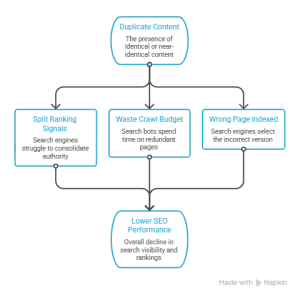
Image Source: Created using Napkin AI.
What Is Duplicate Content and Why Does It Hurt SEO?
Duplicate content is identical or near-identical content that’s accessible through more than one URL. It sounds like a simple problem, but it shows up in more places than most people expect: sorted product listings, printer-friendly pages, WWW versus non-WWW versions of the same domain, and syndicated articles republished elsewhere are all common sources.
A common misconception should be cleared up early. A manual penalty is not usually triggered by duplicate content SEO issues. What actually happens is quieter and, in some ways, more frustrating. Ranking signals are split between duplicate URLs instead of consolidated onto one strong page. Crawl budget is spent revisiting near-identical pages instead of discovering new content. Indexing decisions become unpredictable, and Google sometimes selects a canonical you never intended, a status Search Console labels as duplicate without user-selected canonical.
| Duplicate Content Type | Common Cause | Primary Fix |
| URL parameters / query strings | Filters, sorting, session IDs | Canonical tags + parameter handling |
| WWW vs. non-WWW, HTTP vs. HTTPS | Missing redirects | 301 redirects to one preferred URL |
| Printer-friendly / mobile versions | Separate URL structures | Canonical tags |
| Syndicated or scraped content | Republishing across domains | Cross-domain canonical tag |
| Paginated or faceted navigation | Ecommerce or blog category structures | Self-referencing canonical or view-all canonical |
Data point: A 2026 technical SEO audit analysis from Digital Applied found that over 60% of enterprise sites have conflicting canonical signals or malformed hreflang implementations, splitting ranking signals across duplicate URLs that should otherwise be consolidated onto a single preferred page.
How to Check for Duplicate Content Issues
Diagnosis always comes before the fix. Google Search Console’s Page Indexing report is the fastest place to start, since it flags statuses like duplicate without user-selected canonical and alternate page with proper canonical tag directly, which point straight to the affected URLs.
The URL Inspection Tool goes one level deeper. It shows the canonical Google actually selected for a given page, which is sometimes different from the one declared in your code. That gap is worth checking on your most important pages specifically, since it’s easy to miss otherwise.
For duplication at scale, a site-wide crawl with a tool like Screaming Frog will surface near-duplicate pages that manual review tends to miss, especially across large ecommerce catalogs or content-heavy blogs.
Tip: Don’t only check for exact duplicates. Near-duplicate pages with 80-90% content overlap cause the same dilution problem, and they’re much harder to catch manually since nothing about them looks obviously wrong at a glance.
How to Fix Duplicate Content With Canonical Tags
Canonical tags are the most direct answer to how to fix duplicate content when the duplicate pages need to stay live. Add a rel=”canonical” tag to the HTML <head> of each duplicate page to tell Googlebot which URL to treat as the preferred, indexable version.
Add a self-referencing canonical tag to every indexable page, even if no duplicate versions exist. This baseline SEO best practice removes ambiguity and helps Google identify the preferred URL before duplicate content becomes a problem.

Cross-domain canonical tags solve another common issue: syndicated content. When you republish an article on a partner website, point the cross-domain canonical tag to the original URL. This approach preserves credit for the source and prevents the syndicated version from competing in search results.
Several canonical implementation mistakes appear repeatedly during technical SEO audits. For example, some websites point a canonical tag to a URL that redirects elsewhere, creating unnecessary redirect hops. Others point the canonical tag to a page with a noindex tag, sending Google conflicting signals. Inconsistent canonical tags across paginated pages also create confusion instead of clarifying the preferred version.
Tip: A canonical tag provides Google with a strong hint, not a strict directive. If two pages differ significantly, Google may ignore your preferred canonical, index both pages, or choose a different canonical URL.
How to Fix Duplicate Content Caused by URL Parameters
Query strings are one of the most prolific sources of duplicate URLs on any reasonably large site. Sorting, filtering, and tracking parameters can each generate dozens of parameterized URLs from a single base page, and every one of them is a separate crawlable address as far as Googlebot is concerned.
A few solutions work well together, and they’re listed here in order of preference:
- Add canonical tags pointing to the clean, parameter-free URL on every parameterized variant
- Keep internal linking consistent, and link only to the preferred URL version, never to a parameterized copy
- Use robots.txt disallow rules for low-value parameter patterns at scale, keeping in mind that this blocks crawling, not indexing
- Favor clean, static URL structures from the start wherever the CMS or platform allows it
| Parameter Type | Example | Recommended Fix |
| Sorting or filtering | ?sort=price | Canonical tag to base URL |
| Session IDs | ?sessionid=123 | Eliminate via server config, canonical tag |
| Tracking parameters | ?utm_source=newsletter | Canonical tag to clean URL |
| Pagination | ?page=2 | Self-referencing canonical or view-all canonical |
The Right Redirect Strategy for Duplicate Content
Redirects solve a different problem than canonical tags. A 301 redirect tells search engines that a URL has permanently moved and transfers nearly all ranking signals to the new destination. A 302 redirect indicates a temporary move. Choosing the wrong redirect type can confuse Google about your long-term intentions.
Use 301 redirects when you permanently retire a URL, migrate a domain, or consolidate HTTP to HTTPS and WWW to non-WWW versions. Use canonical tags when near-duplicate pages need to remain live and accessible while pointing Google to the preferred version.
Redirect chains and redirect loops are a recurring technical SEO mistake, and they’re more common than they should be. A chain happens when one redirect leads to another, which leads to another, and each extra hop wastes crawl budget and slows page discovery.
Tip: Redirects should be kept to a single hop wherever possible. Auditing the redirect map after every migration catches chains before Googlebot does, which saves both crawl budget and ranking signal from being lost along the way.
Canonical Tags vs. Redirects vs. Robots.txt: Which One to Use
| Method | Best For | What It Signals to Google |
| Canonical tag | Near-duplicate pages that should stay accessible | Index this URL instead, but both may still be crawled |
| 301 redirect | Fully retired or consolidated URLs | This URL no longer exists, send all signals to the new one |
| Robots.txt disallow | Low-value parameter patterns at scale | Don’t crawl this, but it may still be indexed if linked externally |
| Noindex meta tag | Pages that should stay live but never appear in search | Don’t index this page at all |
Duplicate Content Scenarios by Website Type
The right fix often depends on the type of site involved, since ecommerce catalogs, blogs, and SaaS marketing sites tend to generate duplication in different ways. Recognizing the pattern specific to your platform makes the rest of the audit faster.
Ecommerce sites usually see the most duplication, largely because faceted navigation, color and size variants, and sorting options can multiply a single product into dozens of crawlable URLs. Canonical tags pointed at the base product or category page, paired with careful internal linking, generally resolve most of this without removing the filtering experience users rely on.
Blogs and content sites tend to run into duplication through tag pages, category archives, and printer-friendly or AMP versions of the same article. A self-referencing canonical on the main article, combined with noindex on thin tag archives, usually clears this up.
SaaS and B2B marketing sites often duplicate content across localized pages, comparison pages, or landing pages built for paid campaigns that mirror existing organic pages too closely. A quick content audit paired with consistent canonical tagging typically catches this before it becomes a bigger website optimization problem.
Best Practices to Prevent Future Duplicate Content Issues
- Maintain clean, consistent website architecture with internal linking pointed at a single preferred URL per topic
- Keep the XML sitemap limited to canonical, indexable URLs only, never parameterized duplicates
- Standardize URL structure site-wide, including trailing slashes, casing, and WWW versus non-WWW
- Run a recurring SEO audit to catch new duplication introduced by CMS defaults or plugin updates
- Check Google Search Console monthly for new duplicate without user-selected canonical flags
Final Thoughts
Duplicate content is rarely caused by a single issue. Instead, it results from several small technical problems, such as missing canonical tags, unmanaged URL parameters, or outdated redirect chains. Over time, these issues split ranking signals, waste crawl budget, and gradually reduce organic visibility.
The best way to fix duplicate content is to use the right solution for each situation. Canonical tags, clean URL parameter handling, and a well-planned redirect strategy work together to protect search visibility and support long-term organic growth. Relying on just one solution rarely delivers the best results.
If managing canonical tags, URL parameters, and redirect rules feels overwhelming, Tangence can help. Our SEO Services combine technical SEO expertise with data-driven optimization to help businesses resolve duplicate content, improve crawlability, and strengthen organic visibility. If your rankings have stalled, our team can identify duplicate content issues and recommend the right fixes to restore your search performance.
Frequently Asked Questions
1. How do I fix duplicate content on my website?
Add a self-referencing canonical tag to every indexable page. Point duplicate or parameterized URLs to the preferred version with a canonical tag. Use a 301 redirect for permanently retired URLs. After making changes, check Google Search Console to confirm that Google recognizes the preferred URL.
2. What’s the difference between a canonical tag and a 301 redirect?
A canonical tag tells Google which URL to index while keeping both pages accessible. A 301 redirect permanently sends users and search engines to a new URL. Use canonical tags for near-duplicate pages and 301 redirects for permanently moved or consolidated URLs.
3. Can duplicate content get my website penalized by Google?
Google rarely issues a manual penalty for duplicate content. Instead, duplicate pages split ranking signals, waste crawl budget, and make it harder for Google to identify the correct page to rank. These issues can reduce organic visibility over time.
4. How do URL parameters cause duplicate content issues?
Sorting, filtering, session IDs, and tracking parameters can generate multiple URLs for the same page. Without proper canonical tags or URL parameter management, Google may crawl and index several versions of identical or near-identical content.
5. Should I use robots.txt or canonical tags to handle duplicate pages?
Use canonical tags when you want Google to consolidate ranking signals to a preferred URL. Use robots.txt only to block crawling of low-value parameter URLs at scale. Remember that robots.txt controls crawling, not indexing.
6. What does “Duplicate without user-selected canonical” mean in Google Search Console?
This status means Google found multiple similar URLs but couldn’t identify a clear preferred version. As a result, Google selected its own canonical URL. Adding a self-referencing canonical tag to the preferred page usually resolves the issue.
7. How long does it take Google to recognize a canonical tag?
The timeline depends on your website’s crawl frequency and authority. Google may recognize the change within a few days, but larger websites can take several weeks. You can use the URL Inspection Tool in Google Search Console to check whether Google has processed the updated canonical tag.