-01.svg)
-02.svg)
-03.svg)
-04.svg)
-05.svg)
-06.svg)
-07.svg)
-08.svg)
-09.svg)
-10.svg)
-11.svg)
-12.svg)
-13.svg)
-14.svg)






blog
9 Internal Linking Mistakes That Are Costing You Organic Traffic and How to Fix Them
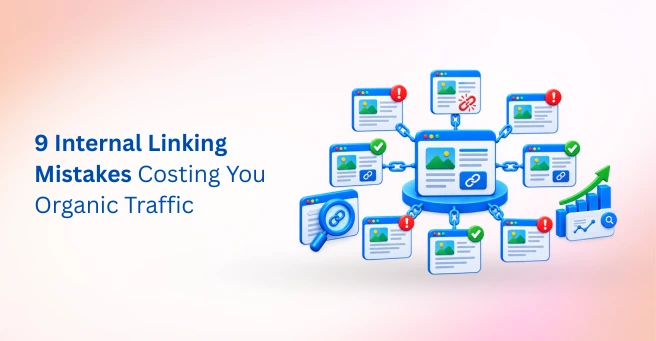
| The most damaging internal linking mistakes are orphan pages, broken links, important pages buried too deep, vague or repetitive anchor text, too many or irrelevant links, links through redirects, misused nofollow, and having no linking strategy. Each one wastes crawl budget, link equity, or relevance signals. Start with broken links and orphan pages, since they are the quickest wins. |
A site publishes strong content for months. The writing is good, the topics are right, and the team is proud of the result. Yet its best pages stall on page two, and nobody can say why. Often, the answer is simple: nothing on the site points to them.
Internal linking is the one ranking lever a site owner fully controls. It needs no outreach, no budget, and no permission. However, internal linking mistakes quietly waste link equity, crawl budget, and relevance signals, and they rarely show up in normal analytics until traffic has already stalled. This guide covers nine specific problems, how to spot each one, and how to fix it.
What Are Internal Linking Mistakes and Why Do They Hurt SEO?
An internal linking error is any structural, technical, or editorial flaw in how a site’s pages link to one another. Some are accidents, such as a link that breaks after a URL change. Others are habits, such as always linking with the phrase “click here.”
Internal links do three jobs. First, they help Googlebot discover and recrawl pages. Second, they pass link equity, often called internal PageRank, from one page to another. Third, their anchor text signals what the destination page is about.
Most errors in this area are silent. They don’t trigger penalties or warnings. Instead, they quietly cap performance, which is why weak internal linking can hold back an otherwise strong site for years. Internal linking is also closely connected to technical SEO because site architecture, crawlability, indexation, and internal link depth determine how efficiently search engines can access important URLs.
| What Internal Links Do | Why It Matters | What Breaks When Done Poorly |
| Guide crawlers to pages | Page discovery and indexing | Orphan pages and deep pages go uncrawled |
| Pass link equity | Ranking strength for key pages | Equity is diluted or stranded |
| Signal topic relevance | Topical authority and context | Vague or mismatched anchor text |
| Shape website architecture | Clear content hierarchy | Confusing structure for users and bots |
The 9 Most Common Internal Linking Errors, With Fixes
Each of the nine problems below follows the same pattern: what it is, why it hurts, and how to fix it. Most can be found in a single site crawl.
1. Leaving Orphan Pages With No Internal Links
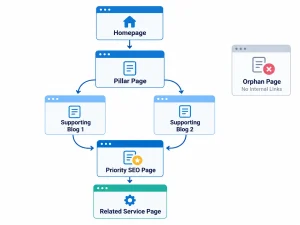
An orphan page has no internal links pointing to it. Googlebot finds most pages by following links, so an orphan is easy to miss. Even when it appears in the XML sitemap, it receives no link equity and sends no relevance signal.
Data point: Screaming Frog research, as reported in a September 2026 internal linking guide from Stay Digital Marketers, found that roughly 96 percent of true orphan pages earn zero organic traffic.
Fix: Compare a full site crawl against your sitemap and Google Search Console data. Then add contextual links to each orphan from two or three related pages. If a page has no value, redirect or remove it instead.
2. Letting Broken Internal Links Pile Up
Broken internal links point to pages that return a 404 error. Each one wastes crawl budget and sends visitors to a dead end. They also accumulate quietly after deletions, migrations, and URL changes.
Fix: Crawl the site monthly and filter for 4xx responses. Update each link to the live URL. If the target page moved, correct the link itself instead of relying on a redirect.
3. Burying Important Pages Deep in the Site Structure
Pages four or more clicks from the homepage tend to be crawled less often and receive less link equity. This is common on large blogs and ecommerce sites, where new content slowly pushes older pages out of reach. A crawl-depth analysis can reveal important pages that are buried several clicks from the homepage and may need stronger internal connections.
Fix: Link priority pages from the homepage, the main navigation, and your highest-traffic posts. Add hub pages that group related content, so every key page sits within three clicks.
4. Using Generic Anchor Text Like “Click Here”
Anchor text such as “click here” or “read more” tells Google nothing about the destination. As a result, a link that could have reinforced topical relevance adds no context at all. Descriptive anchors also help screen reader users, so the benefit extends beyond SEO.
Before: Want to learn more about this? Click here.
After: Our guide to finding and fixing orphan pages walks through the audit step by step.
Fix: Use short, descriptive anchor text that names the topic of the target page. Avoid bare phrases like “this page” or “here.”
5. Repeating the Same Exact-Match Anchor Text Every Time
Linking to a page with the identical keyword phrase every time looks mechanical. It also wastes the chance to describe the page in different ways. In Zyppy’s study, URLs that received a wider variety of internal anchor text were strongly correlated with more Google search traffic.
Exact-match anchors are not forbidden. The point is variety, because natural writing rarely repeats one phrase.
Fix: Choose a primary anchor for each key page, then vary the rest with synonyms, partial matches, and longer descriptive phrases.
6. Adding Too Many or Irrelevant Internal Links
Linking just to add links dilutes the signal. A page has only so much link equity to pass, and links to unrelated pages also blur topical context. Zyppy’s data shows that more incoming internal links generally go with more traffic, but only up to a point, after which the gains level off.
Fix: Link only when the destination genuinely helps the reader. Remove links to off-topic pages, and trim repeated sidebar or footer links that add no value.
7. Linking Through Redirects and Redirect Chains
An internal link that runs through a redirect adds an unnecessary hop. Chains of two or three redirects add more. Each hop uses crawl budget and slows the path to the final page.
Fix: After any migration or URL change, update internal links to point straight to the final URL. Then crawl again to confirm that no chains remain.
8. Misusing Nofollow on Internal Links
Adding rel=”nofollow” to an internal link can stop equity from flowing to a page you want to rank. This often happens by accident, through a plugin setting or a copied template.
Fix: Use normal follow links by default. Filter your crawl for internal nofollow links and remove the attribute unless there is a clear reason, such as a login page.
9. Having No Internal Linking Strategy or Topic Clusters
Random linking produces a random structure. Sites without a plan often forget to link new posts to older ones, and older posts to new ones. As a result, topic clusters never form, and authority stays scattered.
Fix: Build hub-and-spoke topic clusters, with one pillar page linking to focused supporting pages and each of those linking back. Then make “add internal links” a required step in your publishing checklist.
| Mistake | SEO Impact | Fix Difficulty | How to Find It |
| Orphan pages | Pages not discovered or indexed | Low to Medium | Crawl compared with sitemap |
| Broken internal links | Wasted crawl budget, poor UX | Low | Screaming Frog, Search Console |
| Pages buried too deep | Lower crawl frequency, less equity | Medium | Crawl depth report |
| Generic anchor text | Lost relevance signal | Low | Anchor text report |
| Repetitive anchors | Missed relevance variety | Low | Anchor distribution report |
| Too many or irrelevant links | Diluted equity | Medium | Links-per-page report |
| Links through redirects | Crawl waste, slower paths | Low | Redirect report |
| Misused nofollow | Blocked equity flow | Low | Crawl filter for internal nofollow |
| No linking strategy | Scattered topical authority | High | Content and architecture review |
How to Audit Your Internal Links
An audit takes less time than most teams expect. Three sources cover almost everything:
- Google Search Console’s Links report shows which internal pages receive the most links, and the answer is often surprising
- A site-wide crawl with Screaming Frog or Sitebulb flags orphan pages, broken links, redirects, and click depth
- A comparison of crawled URLs against the XML sitemap exposes orphan pages that a link-only crawl cannot find
Once the crawl finishes, group the issues by type rather than by page. A single template error, such as a footer link with the wrong URL, can create hundreds of broken links at once. Fixing it in one place clears them all.
How to Fix Internal Linking Mistakes: A Prioritized Plan
Not every fix deserves equal urgency. The order below balances effort against impact, so the quick wins come first.
- Fix broken links and redirect chains first, because they are fast and low risk
- Rescue orphan pages by linking to them from relevant, well-visited pages
- Pull priority pages closer to the homepage
- Rewrite generic and repetitive anchor text
- Prune excessive or irrelevant links
- Build topic clusters for new and existing content
- Add internal linking to every publishing checklist
Results take time, because they depend on Google recrawling and reprocessing the updated links. Expect weeks for crawl changes and a few months for ranking movement.
Internal Linking Best Practices to Prevent Future Problems
- Link naturally from within body content, not only from menus and footers
- Keep website architecture logical and shallow where it makes sense
- Review internal links quarterly and after every migration
- Pair links with strong content, so equity flows to pages worth ranking
- Use descriptive but varied anchor text
Finally, a clear link structure may help beyond classic rankings. Some AI search systems also draw on how a site connects its pages as a contextual signal, so a tidy structure supports visibility in both places.
Final Thoughts
Most internal linking mistakes are cheap to fix and expensive to ignore. They compound quietly, which is why a regular audit matters more than a one-time cleanup. A site that links well gets crawled more efficiently, passes equity to the right pages, and gives both readers and search engines a clear picture of its topics.
If auditing every link across hundreds of pages sounds like a heavy lift, Tangence can help. Tangence is a full-service digital marketing and SEO services agency with more than two decades of technical SEO experience. Its team audits internal link structure, fixes orphan pages and anchor text issues, and rebuilds site architecture and topic clusters so that link equity reaches the pages that matter. To see where your own site stands, talk to Tangence’s SEO team about an internal linking audit.
Frequently Asked Questions
1. What are the most common internal linking mistakes?
The most common problems are orphan pages, broken links, important pages buried deep in the structure, and vague or repetitive anchor text. Links that run through redirects and a missing linking strategy also appear in most site audits.
2. How many internal links should a page have?
There is no official limit. Link wherever it genuinely helps the reader. Zyppy’s research found that more incoming internal links generally correlate with more traffic, though the gains level off, so relevance should matter more than raw counts.
3. Do nofollow internal links hurt SEO?
They can. A nofollow attribute may stop link equity from flowing to a page you want to rank. Unless there is a clear reason, such as a login or cart page, internal links should use the default follow setting.
4. How do I find orphan pages on my website?
Crawl the site with a tool like Screaming Frog, then compare the results against your XML sitemap and Google Search Console data. Any URL that appears in the sitemap or in Search Console but not in the crawl is likely an orphan.
5. Is exact-match anchor text bad for internal links?
Not inherently. The problem is repeating the same phrase every time. Mix a primary anchor with natural variations, since a wider variety of anchor text has been linked to stronger search traffic in Zyppy’s study.
6. How often should I audit my internal links?
A quarterly audit suits most sites. Run an extra check after every migration, redesign, or large content cleanup, because those are the moments when broken links and redirect chains tend to spike.
7. How do I fix internal linking mistakes on a large website?
Start with the highest-value pages. Fix broken links and redirect chains first, then rescue orphans and shorten click depth for priority pages. Use crawl exports and templates to apply changes in bulk, and add linking to your publishing workflow.