-01.svg) SEO Services
SEO Services-02.svg) Local SEO Services
Local SEO Services-03.svg) AI SEO Services
AI SEO Services-04.svg) Technical SEO Services
Technical SEO Services-05.svg) Performance Marketing
Performance Marketing-06.svg) Social Media
Social Media-07.svg) Content Marketing
Content Marketing-08.svg) Web Development
Web Development-09.svg) App Development
App Development-10.svg) Marketing Automation
Marketing Automation-11.svg) Real Estate
Real Estate-12.svg) Ecommerce
Ecommerce-13.svg) Education
Education-14.svg) Healthcare
Healthcare B2B
B2B SAAS
SAAS Law Firm
 BFSI
BFSI Renewable Energy
 Tour and Travel
blog
H1 to H6 Explained: The Complete Header Tag SEO Guide for 2026
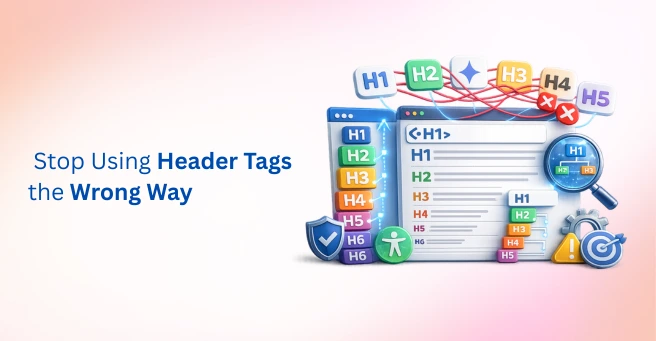
| A header tags SEO guide covers using one H1 per page for the main topic, H2s for major sections, and H3 through H6 for progressively nested detail, without skipping levels. Clean heading hierarchy improves readability, accessibility, and how Google Search and AI Overviews parse and cite a page’s content. |
A page is well-written, well-researched, and still underperforms. The headings jump from an H2 straight to an H4 with no warning, two H1 tags sit on the same page because of a leftover theme setting, and a handful of subheadings exist only because someone made the text bold and called it a day. None of this shows up to a casual reader, but it shows up to Google, and increasingly, it shows up to AI systems trying to figure out what the page is actually about.
This is exactly what a solid header tags SEO guide is meant to prevent. Headings do double duty on every page: they help human readers scan and navigate content, and they help Google Search, screen readers, and AI Overviews understand structure and relevance at a glance. Header tags are just one part of a well-optimized website, and understanding the fundamentals of on-page SEO helps put heading hierarchy into the right context.
This guide walks through what each heading level actually does, how to build a clean heading hierarchy from H1 down to H6, and the mistakes that quietly undermine both SEO and readability.
Data point: A 2026 analysis from SEO consultant Lawrence Hitches found that most heading-tag audits surface the same three or four recurring issues, missing H1s, multiple H1s, vague H2s, and skipped levels, and that fixing just those covers roughly 80% of the work involved in a typical heading cleanup.
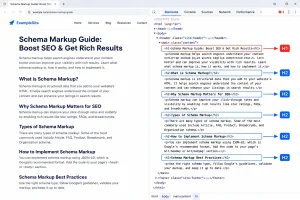
“Chrome DevTools displaying a properly structured H1–H3 heading hierarchy that helps search engines and AI systems understand page structure.”
Image Source: Created using AI.
What Are Header Tags and Why Do They Matter for SEO?
Header tags are HTML elements, H1 through H6, that create a semantic content hierarchy. They’re fundamentally different from font size or bold styling, even though the two are often confused visually. A heading tag tells a browser, a screen reader, and a search engine that a specific block of text introduces a distinct section, while bold text alone communicates nothing structural at all.
Headings serve a dual purpose. For human readers, they support readability and content organization, letting someone scan a page and find the section they actually need. For Google Search and AI Overviews, they act as a page structure and relevance signal, one of the clearest ways a page communicates what it’s about and how its ideas relate to each other.
A common misconception deserves a quick correction here. Headings are not a heavily weighted, direct ranking factor on their own. What they strongly influence is how content gets parsed, featured, and cited, which matters just as much in practice, even if it isn’t a simple one-to-one ranking boost. A well-organized heading structure works alongside technical SEO to help search engines crawl and interpret your pages more effectively.
| Heading Level | Primary Purpose | Typical Use |
| H1 | Main page topic | One per page, matches core search intent |
| H2 | Major sections | Primary subtopics under the H1 |
| H3 | Subsections | Breaks down an H2 topic further |
| H4 to H6 | Granular detail | Rarely needed outside long, complex documents |
H1 Tag Best Practices
One H1 should appear per page, and it should match that page’s primary topic and search intent directly. Most modern CMS platforms handle this automatically, but theme overrides and custom templates are common sources of accidental duplicate H1 tags worth checking manually.
The primary keyword should be included naturally in the H1, without forcing an exact match that reads awkwardly to a human visitor. A title tag and an H1 often overlap in meaning, but they serve different technical purposes, and treating them as identical, word-for-word duplicates is a missed opportunity rather than a requirement. Google Search Central recommends organizing content so that it is easy for users and search engines to understand.

Tip: Avoid using your H1 purely for branding, like just a company name, on content pages. It wastes the single strongest heading signal on a page that could instead describe what the page is actually about.
H2, H3, and the Rest of the Heading Hierarchy
H2s should break a page into its major sections, and ideally, they should mirror how a reader would naturally expect the content to unfold. H3s nest under a relevant H2 and go one level deeper, and a level should never be skipped, such as jumping straight from an H2 to an H4.
Skipping heading levels hurts accessibility in a very concrete way. Screen readers rely on a logical, sequential structure to help users navigate by heading, and a skipped level breaks that navigation outright. It can also confuse how Google Search parses a page’s content hierarchy, since the jump signals that a section may be missing or improperly nested.
H4 through H6 are situational rather than mandatory. They tend to be genuinely useful in long documentation, legal content, or deeply nested comparison guides, but most standard blog posts and landing pages never need to go past H3.
Data point: Multiple SEO tooling providers, including Semrush and Ahrefs, flag skipped heading levels and duplicate H1 tags as standard site audit warnings, and WCAG 2.2’s Section Headings guidance treats a clear, sequential heading structure as a baseline accessibility requirement rather than an optional enhancement.
How to Use Header Tags SEO Guide Principles for Featured Snippets and AI Overviews
Well-structured headings, especially question-phrased H2s and H3s, align closely with how people actually search. A heading like “How do I check my page’s heading structure?” mirrors a real query far more naturally than a vague label like “More Details.”
The connection to AI Overviews and other AI-generated answers follows the same logic. A clear heading structure helps AI systems quickly identify and extract the specific section that answers a given query, since the heading itself often functions as a signal of exactly what the following paragraph covers.
Phrasing key headings as questions, or as clear, direct statements that mirror real search queries, is worth doing wherever it fits naturally into the content. It shouldn’t be forced onto every heading, but the technique pays off disproportionately on the sections most likely to be pulled into a featured snippet or an AI-generated summary.
Tip: Test how your headings read as a standalone outline. If someone could understand a page’s structure from just the headings, without any body text, AI systems and search engines can generally parse it more easily too.
Common Header Tag Mistakes That Hurt SEO and Readability
| Mistake | Why It’s a Problem |
| Multiple H1 tags on one page | Dilutes topical focus, confuses page-level relevance signals |
| Skipping heading levels (H2 to H4) | Breaks accessibility and logical content hierarchy |
| Using headings for styling only | Search engines and screen readers can’t recognize structure |
| Keyword-stuffed headings | Reads unnaturally, risks looking manipulative |
| Empty or vague headings (“More Info,” “Details”) | Provides no real signal about page relevance or content |
Heading Tags on Ecommerce Category and Product Pages
Ecommerce sites run into a specific version of the H1 problem more often than other site types. Shopify and other ecommerce themes often wrap a logo, banner image, or generic “Shop Now” element in an H1 by default. As a result, the actual category or product name may not have an H1 tag at all.
A missing H1 on a homepage or category page is one of the most common technical SEO issues on ecommerce websites. It’s also one of the easiest and most cost-effective fixes. Review your homepage, category page, and product page templates to spot the problem quickly. If the issue exists in a template, it usually affects every page built from it.
Product pages follow a simple heading structure. Use the H1 for the product name. Organize sections such as specifications, reviews, and shipping details under H2 headings. Use H3 headings only when you need to break larger sections into smaller topics. This structure improves readability for shoppers and gives Google and AI systems a clear content hierarchy to understand, especially for informational searches. Chrome DevTools allows you to inspect the HTML structure of a webpage and verify that heading tags are implemented correctly.
Tip: Audit any page in under a minute using a free browser extension that displays a page’s heading outline. On ecommerce sites, checking the homepage, one category page, and one product page usually reveals whether a template-level heading error is affecting the entire site.
Why Heading Hierarchy Increasingly Feeds Two Systems at Once
Heading tags used to serve one primary audience: Google’s traditional ranking systems, alongside human readers scanning a page. That’s no longer the full picture. AI search engines, including ChatGPT, Perplexity, Claude, and Google AI Overviews, increasingly rely on heading hierarchy to understand page structure. Clear headings help these systems identify what a page is about and determine which sections are most relevant to include in generated answers. As AI search evolves, heading hierarchy has become an important part of Generative Engine Optimization (GEO), helping large language models understand page structure more accurately.
A well-structured page is more likely to succeed in both traditional search results and AI-generated responses. In contrast, inconsistent or poorly organized headings can reduce visibility in both. That’s why heading hierarchy deserves more attention in 2026. It’s no longer just a minor on-page SEO task, it’s a core part of building content that performs across both search engines and AI platforms.
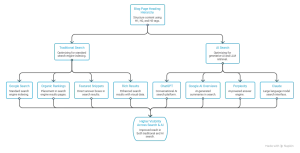 Image Source: Created using Napkin AI.
A Simple Heading Structure Checklist for Any Page
- One H1 that reflects the page’s core topic and search intent
- H2s for each major section, arranged in a logical, reader-friendly order
- H3s nested properly under the relevant H2, never skipping a level
- No headings used purely for visual styling instead of semantic HTML
- Keywords included naturally, never forced or repeated mechanically
- Headings reviewed as a standalone outline before the page gets published
Final Thoughts
Proper heading hierarchy is a small but powerful SEO habit. It improves readability, accessibility, and the way search engines and AI systems interpret your content. While it rarely gets as much attention as content quality or backlinks, it plays a major role in whether those efforts are understood and rewarded.
Following a solid header tags SEO guide from the beginning saves time and prevents costly restructuring later. This is especially true for large websites, where a single template issue can create heading errors across hundreds of pages.
If auditing heading structure across an entire website sounds overwhelming, it’s exactly the kind of technical SEO work Tangence Solutions handles every day. Our SEO services include auditing heading hierarchy, fixing structural issues, and building SEO-friendly page architecture that helps websites perform better in both traditional search and AI-driven search experiences. If your content deserves better rankings, a comprehensive on-page SEO audit can reveal whether your heading structure is holding it back.
Frequently Asked Questions
1. How many H1 tags should a page have?
Exactly one. A single H1 per page keeps the topical focus clear for both search engines and readers. Having more than one dilutes that signal rather than strengthening it.
2. Do header tags directly affect Google rankings?
Not heavily on their own, but they strongly influence how content gets parsed, organized, and understood. As explained in this header tags SEO guide, proper heading structure improves relevance, readability, and featured snippet eligibility, which can positively impact SEO performance.
3. Can I skip heading levels, like going from H2 straight to H4?
It’s not recommended. Skipping levels breaks the logical content hierarchy, creates accessibility problems for screen reader users, and can confuse how Google Search interprets the structure of a page.
4. Should every heading include my target keyword?
No. Keywords should appear naturally where they fit, particularly in the H1 and a few key H2s. Forcing a keyword into every heading makes the content sound unnatural and can appear manipulative.
5. Do header tags matter for AI Overviews and featured snippets?
Yes. Clear, well-structured headings, especially those phrased as questions, help both traditional featured snippets and AI Overviews identify and extract the section that best answers a search query.
6. What’s the difference between an H1 tag and a title tag?
A title tag appears in search results and browser tabs, while an H1 tag appears within the page’s visible content. They often overlap in meaning, but they serve different technical purposes and don’t need to be identical.
7. How do I check if my page’s heading structure is correct?
Browser extensions and SEO audit tools like Semrush and Ahrefs can display your complete H1–H6 hierarchy and flag missing H1s, skipped heading levels, and other structural issues. Following the recommendations in this header tags SEO guide can help you build a clean, SEO-friendly heading structure.