-01.svg)
-02.svg)
-03.svg)
-04.svg)
-05.svg)
-06.svg)
-07.svg)
-08.svg)
-09.svg)
-10.svg)
-11.svg)
-12.svg)
-13.svg)
-14.svg)






blog
301 vs 302 Redirects: What’s the Difference and Which Should You Use?

| A 301 redirect signals a permanent move and transfers ranking signals to the new URL, while a 302 redirect signals a temporary move and keeps ranking signals with the original URL. Choosing correctly between a 301 vs 302 redirect matters because using the wrong one can leave link equity stranded on a URL that no longer serves real content. |
A site migrates a batch of URLs during a redesign, and someone picks a redirect type without thinking twice about it. A few weeks later, rankings start sliding for reasons nobody on the team can quite pin down, and the eventual answer traces back to one small technical decision made in a hurry.
This is exactly the kind of mistake that a clear understanding of 301 vs 302 redirect behavior prevents. A 301 tells search engines a move is permanent. A 302 tells them it’s temporary. Googlebot treats link equity very differently depending on which one it sees, even though the redirect looks identical to a browser and to any visitor clicking through.
This guide covers what each status code actually means, how they affect SEO differently, and a clear framework for choosing the right one in any given situation.
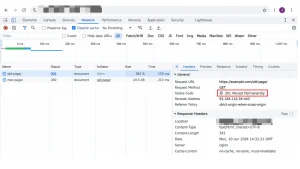
Image Source: Screenshot taken from Chrome DevTools Network tab.
301 vs 302 Redirect: What’s the Difference?
A 301 is an HTTP status code signaling a permanent redirect. A 302 is an HTTP status code signaling a temporary redirect. Both send a visitor to a new URL in well under a second, and from a browser’s perspective, the two behave identically.
The real difference lives in what each code tells a search engine crawler, not what it tells a human. A 301 instructs Googlebot to transfer ranking signals to the new URL, treating the original as permanently retired. A 302 instructs Googlebot to keep the original URL indexed and treat it as the one that still matters, since the redirect isn’t expected to last. The distinction also connects closely with URL canonicalization, particularly when multiple URLs can represent similar or duplicate content.
A common point of confusion is worth clearing up directly. Browsers follow both redirect types identically from a user’s standpoint, so the difference is completely invisible to visitors. It only matters to search engines and other automated systems reading the underlying HTTP response. Redirects are also one of the signals Google considers when determining which URL should be treated as canonical, alongside factors such as canonical tags and sitemap URLs.
| Attribute | 301 Redirect | 302 Redirect |
| HTTP status code | 301 | 302 |
| Signal to search engines | Permanent move | Temporary move |
| Link equity / SEO value | Transfers to new URL | Generally stays with original URL |
| Indexing behavior | Original URL gets replaced in the index | Original URL typically stays indexed |
| Best for | Permanent migrations, merged content | Temporary promotions, A/B tests, maintenance |
How 301 and 302 Redirects Affect SEO Differently
A 301 passes the substantial majority of ranking signals to the destination URL, which is exactly why it’s the standard choice for anything meant to be permanent. A 302 is designed to preserve the original URL’s standing, since search engines assume, correctly in a genuinely temporary case, that the original will return to active use.
The real-world risk shows up when the choice gets made incorrectly. Using a 302 for a permanent change can leave ranking signals stranded on a URL that no longer serves real content, quietly suppressing performance without any obvious cause. This is precisely the scenario that trips up teams during migrations, when a 302 gets used as a quick, low-risk-feeling default and never gets revisited afterward. This is why redirects should be considered as part of the site’s broader technical SEO strategy rather than treated as an isolated implementation task.
Google’s own handling has evolved somewhat. Google has stated it can eventually treat a long-lived 302 more like a 301 over time, but relying on that behavior is genuinely risky compared to simply choosing the correct code from the start. Waiting for Google to reinterpret a mislabeled redirect is not a strategy, it’s a delay with an uncertain timeline.
301 vs 302 Redirect: When to Use Each One
Here’s a clear framework for the 301 vs 302 redirect decision, broken down by situation rather than left as an abstract rule.
A 301 redirect is the right call for a permanent website or domain migration, for merging two pages or consolidating duplicate content, for a permanent URL structure change, and for retiring an old page in favor of a permanent replacement.
A 302 redirect suits a genuinely temporary situation instead: maintenance or downtime expected to resolve soon, an A/B test or a short-term promotional page, geo-based or device-based redirection that only applies under specific conditions, and any case where the original URL will return to active use shortly. During a site migration, Google recommends mapping old URLs to their new destinations and using server-side permanent redirects when the move is permanent.
| Scenario | Recommended Redirect |
| Domain migration | 301 |
| Merging duplicate pages | 301 |
| Site redesign with new URL structure | 301 |
| Temporary maintenance page | 302 |
| Limited-time promotional page | 302 |
| A/B test variant | 302 |
Implementing Redirects Correctly at the Server Level
Choosing the right status code is only half the job. How a redirect actually gets implemented at the server level determines whether it behaves the way it’s intended to in practice, regardless of which code was selected.
Most modern CMS platforms and redirect plugins include an explicit setting for permanent versus temporary redirects, which maps directly to a 301 or a 302 respectively. Apache servers typically default to a 302 unless a redirect is explicitly marked permanent in the configuration, while Nginx requires setting the return code directly, making it easy to leave the wrong one in place by accident if a template gets copied from an old project.
Testing a redirect after deployment matters just as much as configuring it correctly the first time. A quick command-line check or a browser extension that displays HTTP status codes confirms the live behavior directly, rather than trusting that a CMS setting was saved and applied the way it was intended to be.
Common 301 and 302 Redirect Mistakes That Hurt SEO
- Using a 302 for a permanent change, stranding link equity indefinitely
- Creating redirect chains, where one redirect leads to another before reaching the final destination
- Creating redirect loops, where a URL eventually redirects back to itself
- Redirecting many old URLs to an unrelated homepage instead of the closest relevant equivalent
- Leaving temporary 302 redirects in place for months or years after the original reason has passed
- Keeping your site’s internal linking structure clean also reduces the need for users and crawlers to pass through unnecessary redirects.
How to Check and Audit Your Website’s Redirects
Google Search Console’s Page Indexing report is the fastest way to spot pages affected by redirects and check their current indexing status. The URL Inspection Tool goes a step further, confirming exactly which status code a specific URL is actually returning right now.
Site-wide crawls using tools like Screaming Frog or Sitebulb catch redirect chains, loops, and mismatched redirect types at scale, which is essential on anything larger than a small site. A thorough audit typically flags every 302 that’s been live for more than 90 days as worth a second look, since that duration is a reasonable signal that a redirect has quietly outlived its original, genuinely temporary purpose.
A thorough redirect audit typically checks several things at once: whether every intended redirect actually returns the expected status code, whether any chain exceeds a single hop, whether destination URLs genuinely exist rather than looping back into another error, and whether high-authority pages with existing backlinks are redirected to a closely relevant destination rather than a generic homepage.
Cross-referencing redirected URLs against a site’s backlink profile helps prioritize which fixes matter most, since a mislabeled redirect on a heavily linked page causes disproportionately more damage than the same mistake on a page nobody links to.
Final Thoughts
The difference between a 301 and a 302 seems small on the surface, but it directly determines whether link equity and ranking signals transfer to a new URL or stay behind on one that no longer serves any real purpose.
The decision is genuinely straightforward once the underlying logic is clear. A permanent change gets a 301. A temporary change gets a 302. The wrong choice compounds quietly over time, rather than causing an obvious, easily traced problem right away, which is exactly what makes it worth getting right from the start.
Getting the 301 vs 302 redirect decision right at the start of a migration avoids the slow, hard-to-diagnose ranking loss that comes from choosing incorrectly. If auditing existing redirects, fixing chains, and building a proper redirect strategy across an entire site sounds like more than your team wants to track manually, that’s exactly the kind of technical SEO work Tangence Solutions handles for clients regularly.
As a full-service digital marketing and SEO services agency with deep technical SEO expertise, redirect strategies are built by Tangence, existing redirects are audited for chains and mismatches, and link equity is protected through migrations for clients across industries.
Frequently Asked Questions
1. What is the main difference between a 301 and a 302 redirect?
The core 301 vs 302 redirect difference comes down to permanence. A 301 signals a permanent move and transfers ranking signals to the new URL. A 302 signals a temporary move and keeps those signals with the original URL, since search engines expect the original to return to use.
2. Does a 302 redirect pass link equity like a 301 does?
Generally, no. A 302 is designed to preserve the original URL’s standing rather than transfer its value, since it signals the redirect is temporary and the original page is still the one that matters.
3. Which redirect should I use for a permanent website migration?
A 301 redirect is the correct choice for a permanent migration. It tells search engines the change is final and transfers ranking signals to the new URL, which is essential for preserving traffic through the transition.
4. Can using the wrong redirect type hurt my search rankings?
Yes. Using a 302 for a permanent change can leave ranking signals stranded on a URL that no longer serves real content, quietly suppressing performance in a way that’s often difficult to trace back to its actual cause.
5. How long can a 302 redirect stay in place before it becomes a problem?
There’s no official hard limit, but most technical SEO audits flag any 302 still live after roughly 90 days as worth reviewing, since that’s a reasonable sign the situation may no longer be genuinely temporary.
6. How do I check which redirect type a URL is currently using?
Google’s URL Inspection Tool shows the current status code for a specific URL, while site-wide crawl tools like Screaming Frog reveal redirect types, chains, and loops across an entire website at once.
7. What’s the difference between a redirect chain and a redirect loop?
A redirect chain happens when one redirect leads to another before reaching the final destination, wasting crawl budget along the way. A redirect loop happens when a URL eventually redirects back to itself, trapping crawlers and visitors in an endless cycle.