-01.svg) SEO Services
SEO Services-02.svg) Local SEO Services
Local SEO Services-03.svg) AI SEO Services
AI SEO Services-04.svg) Technical SEO Services
Technical SEO Services-05.svg) Performance Marketing
Performance Marketing-06.svg) Social Media
Social Media-07.svg) Content Marketing
Content Marketing-08.svg) Web Development
Web Development-09.svg) App Development
App Development-10.svg) Marketing Automation
Marketing Automation-11.svg) Real Estate
Real Estate-12.svg) Ecommerce
Ecommerce-13.svg) Education
Education-14.svg) Healthcare
Healthcare B2B
B2B SAAS
SAAS Law Firm
 BFSI
BFSI Renewable Energy
 Tour and Travel
blog
How to Do a Backlink Audit and Disavow Toxic Links: Step-by-Step Guide for 2026
| To do a backlink audit, pull your full link profile from Google Search Console plus a tool like Ahrefs or Semrush, segment it by referring domain, and score each one for spam signals like Spam Score, Toxicity Score, and anchor text patterns. Attempt manual link removal first, and only submit a disavow file through Google Search Console for confirmed manual actions or clear negative SEO, not for ordinary low-quality links. |
Rankings drop for no obvious reason, and there’s been no algorithm update in the news, no content changes, nothing that explains it. A backlink profile audit turns up dozens of spammy, foreign-language links pointing to old blog posts that nobody remembers building. It’s an unsettling moment, and it’s more common than most site owners realize.
Here’s the reassuring part before anything else: learning how to do a backlink audit doesn’t mean panicking over every low-quality link a site has ever picked up. Since Google’s Penguin algorithm moved to a real-time model in 2016, most link spam is devalued automatically rather than triggering a penalty. Disavowing is still the right move in specific situations, and this guide covers exactly when and how.
What follows is a complete walkthrough: what a backlink audit actually involves, how to spot toxic backlinks with confidence, and how to use Google’s Disavow Tool correctly when it’s genuinely warranted. A sample disavow file, a full risk-assessment table, and seven frequently asked questions are included as well.

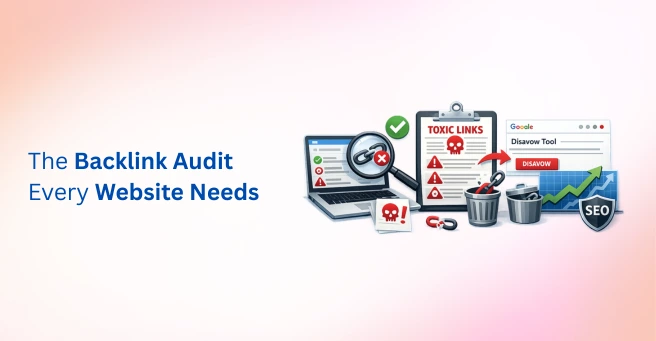
Image Source: Created using Napkin AI.
What Is a Backlink Audit and Why Does It Matter?
A backlink audit is a systematic review of every referring domain and referring page linking to a website. Link quality, anchor text distribution, the follow-versus-nofollow ratio, and any patterns resembling link spam are all examined during the process.
The Penguin algorithm’s current role deserves a quick clarification, since a lot of outdated advice still circulates online. Most spam is devalued algorithmically today, and it doesn’t require any action. Manual actions and aggressive negative SEO campaigns, where a competitor deliberately builds spam links to a target site, are the scenarios where a disavow response genuinely helps.
| Backlink Audit Focus Area | What It Reveals | Why It Matters |
| Referring domains | Diversity and quality of linking sites | Concentration risk, spam patterns |
| Anchor text distribution | Over-optimization or manipulation signals | Unnatural link risk |
| Follow vs. nofollow ratio | Natural vs. engineered link profile | Link equity flow |
| Domain-level metrics (DA, DR, Trust Flow, Spam Score) | Authority and trustworthiness of linking domains | Prioritization for review |
Data point: According to Semrush data cited by Searchlab’s 2026 link building report, an average of 47% of all websites carry at least one toxic backlink, yet Moz’s best-practice guidance still recommends a quarterly audit rather than a reactive one triggered only by a ranking drop.
How to Do a Backlink Audit Step-by-Step
Here’s exactly how to do a backlink audit that separates genuine risk from ordinary background noise. Each step builds on the last, so skipping ahead to the disavow tool without the earlier groundwork tends to cause more harm than good.
Step 1: Pull Your Full Backlink Profile
Google Search Console’s Links report is the free starting point, and it comes directly from Google’s own data. Cross-checking this against a paid tool such as Ahrefs, Semrush, Moz, or Majestic rounds out the picture, since each platform indexes a slightly different slice of the web and surfaces metrics like Domain Rating, Domain Authority, Trust Flow, and Citation Flow.
Step 2: Organize and Segment the Data
Sorting by referring domain, rather than referring page, is essential. A single spammy domain can generate hundreds of linking pages, and reviewing by page count alone makes the problem look far larger, or far smaller, than it actually is.
Step 3: Score Each Domain for Risk
Spam Score, the Trust Flow to Citation Flow ratio, and a manual look at the linking page’s content and niche relevance are the three checks worth running on every domain that looks even slightly suspicious.
Step 4: Flag Toxic and Suspicious Patterns
Specific red flags are covered in detail in the next section, but at this stage, every domain should be sorted into a clear risk tier: safe, worth watching, or high risk.
Step 5: Attempt Manual Link Removal First
Outreach to the webmaster requesting removal should always be tried before disavowing. It’s slower, but it’s the cleaner solution, and it avoids the risk of accidentally disavowing a link that was actually contributing positive link equity.
Step 6: Build and Submit a Disavow File, Only If Needed
A disavow file should be reserved for links that manual removal couldn’t resolve, and where a confirmed manual action or clear negative SEO pattern justifies it.
Tip: A backlink audit should be run at least quarterly, not just after a ranking drop. Catching a spam link pattern early is far easier than untangling it after months of accumulation.
How to Identify Toxic and Spammy Backlinks
A few patterns show up again and again in audits, and each one is worth learning to recognize on sight. Irrelevant or unrelated niche sites, foreign-language link farms, exact-match anchor text overuse, private blog networks, sitewide footer or sidebar links, and links from previously penalized domains are the most common red flags.
A handful of metrics make this process faster. A high Spam Score, a low Trust Flow relative to Citation Flow, and little or no organic traffic to the linking domain are all signals that a link deserves closer scrutiny rather than automatic distrust.
| Red Flag | What It Suggests | Risk Level |
| Exact-match anchor text overuse | Manipulative link building | High |
| Sitewide footer or sidebar links | Paid or scheme-based links | High |
| Irrelevant niche or topic | Low editorial value | Medium |
| Low Trust Flow, high Citation Flow | Spammy or low-quality domain | High |
| Foreign-language link farms | Automated or PBN link networks | High |
Data point: Google’s Webspam Team has stated that private blog networks are identified with roughly 97% accuracy and are ignored or penalized automatically, which is one more reason most PBN links don’t require manual disavowing once SpamBrain has already processed them.
How to Use Google’s Disavow Tool Correctly
A disavow file tells Google to ignore specific backlinks, or entire domains, when it assesses a site’s link profile. It’s a precise tool, and it’s meant to be used sparingly rather than as a default cleanup habit.
Disavowing is genuinely necessary in a few specific situations: a confirmed manual action for unnatural links, clear evidence of a negative SEO campaign, or a large volume of high-risk links that manual removal outreach failed to resolve. Disavowing is not necessary for a handful of low-quality links, isolated spam, or the ordinary background noise most established sites carry.
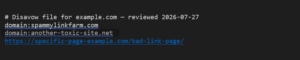
The file itself follows a simple format. Use domain-level entries for clearly spammy websites, and use specific URL entries only for isolated bad pages on an otherwise legitimate domain. After you create the file, upload it through Google Search Console’s Disavow Tool. Then monitor the results over the following weeks and months instead of expecting immediate changes.
Building High-Quality Backlinks After the Cleanup
A clean backlink profile is the foundation, not the finish line. Editorial backlinks earned through genuine content quality, digital PR, and targeted outreach are what actually move rankings forward once the cleanup is done.
Diversifying referring domains matters more than chasing raw link volume. A smaller number of relevant, high-quality backlinks consistently outperforms a large batch of low-effort ones, and it’s far less likely to need another cleanup cycle down the line.
Data point:Searchlab’s 2026 report references a Semrush case study showing that sites actively cleaning up toxic links achieved an average 8.4% improvement in rankings within three months. These findings suggest that removing genuinely toxic backlinks can deliver measurable SEO results.
Tip:Set up backlink alerts in your preferred SEO tool so it automatically flags new referring domains. Continuous monitoring helps you identify suspicious links early and reduces the need for future disavow efforts.
Backlink Checker Tools Compared
Google Search Console remains the only free, first-party source of backlink data, but it doesn’t surface metrics like Domain Rating or Spam Score on its own. A paid backlink checker fills that gap, and each of the major platforms has a slightly different strength worth knowing before choosing one.
| Tool | Signature Metric | Best For |
| Ahrefs | Domain Rating (DR) | Largest link index, strong for competitor backlink analysis |
| Semrush | Toxicity Score | Built-in toxic link scoring alongside full-site SEO audits |
| Moz | Domain Authority (DA), Spam Score | Simple, fast spam checks for smaller sites |
| Majestic | Trust Flow, Citation Flow | Historical link data and link quality-versus-quantity analysis |
No single tool captures every referring domain on the web, since each platform crawls and indexes links independently. Cross-checking at least two of these alongside Google Search Console gives a far more complete backlink profile than relying on just one source.
Final Thoughts
A backlink audit isn’t a one-time fire drill. It’s an ongoing part of a healthy backlink strategy and off-page SEO. The best approach is to make it a quarterly habit instead of waiting until rankings drop.
Disavowing should always be a targeted, evidence-based decision. It shouldn’t be a reflexive response to every unfamiliar referring domain. Knowing how to do a backlink audit properly, and when to use the disavow tool, helps protect your link equity instead of accidentally discarding valuable backlinks.
Reviewing hundreds or even thousands of referring domains can be time-consuming. That’s where Tangence Solutions can help. As a full-service digital marketing and SEO services agency, we provide comprehensive backlink audits, technical SEO, off-page SEO, link profile analysis, and disavow file management.
If you have experienced a sudden ranking drop and suspect your backlink profile may be the cause, Tangence’s SEO team can perform a complete backlink audit and recommend the right actions to restore and strengthen your search visibility.
Frequently Asked Questions
1. How do I do a backlink audit for my website?
Pull your full backlink profile from Google Search Console and a tool like Ahrefs or Semrush. Then segment the data by referring domain and evaluate each domain for spam signals such as Spam Score and anchor text patterns. Always attempt manual link removal before submitting a disavow file.
2. How often should I run a backlink audit?
A quarterly cadence is the general best-practice recommendation from most SEO tool providers. Waiting until a ranking drop forces the issue usually means the toxic link pattern has already had months to accumulate.
3. What is considered a toxic or spam backlink?
A toxic backlink typically comes from an irrelevant or foreign-language site, a private blog network, or a domain with a high Spam Score and little genuine traffic. Sitewide footer links and exact-match anchor text overuse are common accompanying signals.
4. Does disavowing backlinks actually improve rankings?
It can, but mainly in cases involving a confirmed manual action or a genuine negative SEO attack. For sites without either issue, disavowing ordinary low-quality links rarely produces a noticeable ranking change on its own.
5. What’s the difference between Domain Authority, Domain Rating, and Trust Flow?
Domain Authority is Moz’s proprietary score, Domain Rating is Ahrefs’ equivalent metric, and Trust Flow is Majestic’s measure of link quality based on proximity to trusted seed sites. None of these are official Google ranking factors, but each is useful for relative comparison.
6. Can I remove a bad backlink without using the disavow tool?
Yes. This should be the first option tried. Reaching out directly to the webmaster or site owner and requesting removal resolves many cases without ever needing to touch the disavow tool.
7. Will Google penalize me for backlinks I didn’t build myself?
Rarely, for ordinary spam. Google’s SpamBrain system devalues most low-quality links algorithmically without penalizing the receiving site. A manual action or a clear negative SEO campaign are the situations where a real response, including a disavow file, becomes necessary.