-01.svg)
-02.svg)
-03.svg)
-04.svg)
-05.svg)
-06.svg)
-07.svg)
-08.svg)
-09.svg)
-10.svg)
-11.svg)
-12.svg)
-13.svg)
-14.svg)






blog
What Is Crawl Budget? Common Crawl Issues That Hurt SEO Rankings
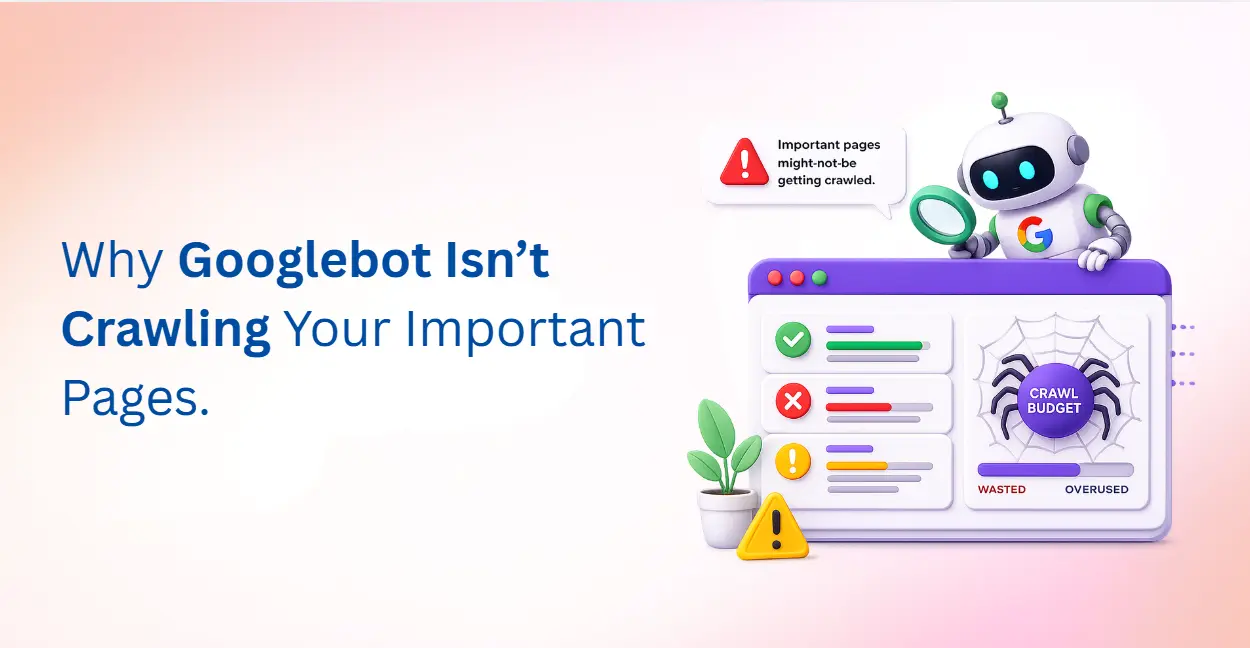
| Crawl budget is the number of URLs Googlebot crawls and indexes on a website within a given timeframe. It is shaped by two factors: crawl capacity (how much Googlebot can crawl without overloading the server) and crawl demand (how much Google wants to crawl based on page authority and freshness). When crawl budget is wasted on duplicate pages, orphan pages, or redirect chains, important pages miss indexation, directly hurting SEO rankings. |
You have optimised your content, built authoritative backlinks, and ticked every on-page SEO box yet some of your most important pages still refuse to show up in Google search results. The problem may not be your content at all. It could be something happening long before a user ever types a query: what is crawl budget, and whether Googlebot is spending it wisely on your website.
Crawl budget is one of the most misunderstood concepts in technical SEO. Many site owners focus exclusively on keywords and backlinks while ignoring how efficiently search engine bots navigate and index their websites. For large websites especially, poor crawl management can silently sabotage rankings, keeping valuable pages stuck in the shadows of Google’s index.
In this guide, you will learn exactly what crawl budget means, how Google crawl budget works, which common crawl issues are hurting your SEO rankings, and the step-by-step fixes that will restore crawl efficiency across your site.
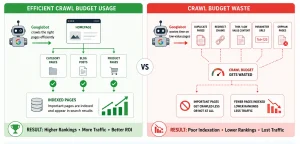
Image Source: AI-generated illustration
What Is Crawl Budget And Why Should SEOs Care?
In simple terms, what is crawl budget? It is the number of URLs that Googlebot will crawl and attempt to index on your website within a given timeframe. Think of it as a limited resource that Google allocates to every website based on two key factors: how capable your server is of handling Googlebot’s visits, and how much interest Google has in crawling your content.
Google formally recognises crawl budget as being shaped by two underlying components.
1. Crawl Capacity
Crawl capacity refers to the upper limit of how many simultaneous connections Googlebot can make to your server without slowing it down or causing errors. If your server responds slowly or returns frequent 5xx errors, Googlebot throttles its crawl rate to protect your server, which means fewer pages get crawled per day. A fast, stable server directly increases your effective crawl capacity.
2. Crawl Demand
Crawl demand reflects how much Googlebot wants to visit your pages. Pages with strong backlink profiles, frequent content updates, or high internal link authority attract greater crawl demand. Conversely, stale or low-authority pages generate less crawl demand and may go weeks without being recrawled. Crawl frequency, therefore, is not uniform across your site. It is shaped by each page’s perceived importance and freshness.
For websites with fewer than a thousand pages and a clean structure, crawl budget is rarely a pressing concern. However, for large ecommerce platforms, news portals, and enterprise websites managing thousands of crawlable URLs, it becomes a foundational technical SEO priority. Wasting crawl budget on the wrong pages means your most important content gets crawled less frequently or not at all.
How Google Crawl Budget Works
Understanding how google crawl budget is calculated and distributed helps you make smarter decisions about your site architecture and content strategy.
When Googlebot visits your website, it does not crawl every URL it finds at random. It follows a priority queue shaped by several signals:
| Ranking Signal | How It Affects Crawl Budget | SEO Impact |
|---|---|---|
| Backlink Authority | Pages with strong backlinks get crawled more often | Faster indexing |
| XML Sitemap | Helps Google discover priority URLs | Better crawl efficiency |
| Internal Linking | Shallow pages get more crawl attention | Improves indexation |
| Content Freshness | Frequently updated pages attract more crawls | Faster content discovery |
| Crawl History | Stable pages build Googlebot trust | Increased recrawl frequency |
Crawl waste occurs when Googlebot burns through its allocation on URLs that offer no ranking value: duplicate pages, parameter-based URL variants, redirect chains, or thin auto-generated content. Every page crawled unnecessarily is a page taken away from something more important.
Google Search Console’s Crawl Stats report, found under Settings gives you a direct view into your site’s crawl management data. It shows total crawl requests per day, average response times, crawled file types, and the HTTP response codes Googlebot is encountering. Monitoring this report regularly is the foundation of proactive crawl management.
7 Common Crawl Issues That Hurt SEO Rankings
Now that you understand the mechanics, let us examine the most damaging crawl issues that technical SEO audits consistently uncover and the fixes that resolve them.
1. Crawl Waste From Duplicate Pages
Duplicate content is one of the leading causes of crawl waste. When multiple URLs serve identical or near-identical content, due to URL parameters, session IDs, tracking codes, or printer-friendly versions – Googlebot crawls all of them. This drains crawl budget without producing any additional indexable value.
Fix: Implement canonical tags on all duplicate or near-duplicate pages to signal the preferred URL to Googlebot. Ensure your canonical tag points to the version you want indexed. Additionally, use Google Search Console’s URL Parameters tool to instruct Googlebot to ignore low-value parameter variations.
2. Orphan Pages That Googlebot Cannot Discover
Orphan pages are URLs that exist on your website but receive no internal links from any other page. Because Googlebot primarily discovers pages by following links. Orphan pages are invisible to its crawlers no matter how strong their content may be. They represent a double loss: wasted content investment and zero contribution to indexability.
Fix: Run a crawl audit using tools like Screaming Frog or Semrush to identify orphaned URLs. Then audit your internal linking structure and connect these pages to relevant hubs, category pages, or the sitemap. A strong internal linking architecture ensures every important page is within a few clicks of the homepage.
3. A Bloated or Misconfigured XML Sitemap
Your XML sitemap is meant to guide Googlebot toward your most important crawlable URLs. However, a poorly maintained sitemap can actively harm crawl efficiency. Including URLs that return 404 errors, have been redirected, are marked noindex, or feature duplicate content confuses Googlebot’s prioritisation logic and erodes trust in your sitemap signals.
Fix: Audit your XML sitemap monthly. It should contain only canonical, indexable, 200-status URLs. Remove redirected, broken, and noindex URLs from the sitemap immediately. Submit your clean sitemap to Google Search Console and monitor the Indexed vs. Submitted ratio in the Sitemaps report.
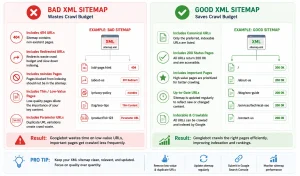
Image Source: AI-generated illustration
4. robots.txt Errors That Block Important Pages
A misconfigured robots.txt file can accidentally disallow Googlebot from accessing CSS files, JavaScript resources, or critical landing pages. When Googlebot cannot render your pages, because the resources that build them are blocked, it cannot assess their quality, which directly impacts indexability and rankings.
Fix: Use Google Search Console’s robots.txt Tester to validate your current rules. As a general principle, robots.txt disallow directives should be reserved for admin pages, internal search result pages, staging URLs, and duplicate parameter-based URLs. Never block CSS or JS files that are required for Googlebot to render your pages correctly.
5. Slow Server Response Times Reducing Crawl Capacity
Server speed has a direct and measurable impact on crawl capacity. When your server responds slowly, above 500ms consistently, Googlebot deliberately slows its crawl rate to avoid overwhelming it. This means fewer pages crawled per day, reduced googlebot crawling frequency, and slower discovery of new or updated content.
Fix: Target a server response time (Time to First Byte) of under 200ms. Use a Content Delivery Network (CDN), enable server-side caching, upgrade to faster hosting infrastructure, and reduce database query load. Monitor server response times in Google Search Console’s Crawl Stats and set up alerts for spikes.
6. Thin or Low-Quality Pages Wasting Crawl Demand
Google’s crawl demand algorithm is influenced by content quality signals. Sites with large volumes of thin pages, auto-generated category permutations, shallow product descriptions, or templated location pages with minimal unique content – see their overall crawl frequency decline. Googlebot learns that a high proportion of your pages offer little value and begins to visit less often.
Fix: Conduct a content audit and apply one of three remedies to thin pages: improve and expand them with unique, useful content; consolidate similar pages into a stronger single URL; or add a noindex meta tag and remove them from your XML sitemap. Reducing the proportion of low-value crawlable pages improves crawl demand for your high-priority URLs.
7. Redirect Chains and Redirect Loops
Every redirect hop consumes a portion of your crawl budget. A redirect chain where URL A redirects to URL B, which redirects to URL C, forces Googlebot to make multiple requests to reach a single destination. At a certain chain length, Googlebot abandons the crawl entirely. Redirect loops, where two or more URLs redirect to each other indefinitely, are even more damaging and can cause Googlebot to flag your site as unreliable.
Fix: Audit all redirects using Screaming Frog or a dedicated redirect checker tool. Collapse all chains to a single hop, every redirect should point directly to its final destination URL. Eliminate redirect loops immediately and monitor for them after every site migration or URL restructure.
| Crawl Issue | Impact on Crawl Budget | Recommended Fix |
|---|---|---|
| Duplicate Pages | Wastes crawl demand on duplicate or non-unique URLs | Implement canonical tags |
| Orphan Pages | Prevents Googlebot from discovering important pages | Strengthen internal linking structure |
| Bloated XML Sitemap | Confuses crawl prioritization signals | Include only canonical, indexable 200-status URLs |
| robots.txt Errors | Blocks Googlebot from accessing key pages or resources | Audit and test robots.txt rules in Google Search Console |
| Slow Server Response | Reduces crawl capacity and daily crawl rate | Improve TTFB, enable CDN, and use caching |
| Thin or Low-Quality Pages | Lowers overall crawl frequency across the website | Improve, consolidate, or noindex weak pages |
| Redirect Chains & Loops | Consumes crawl budget with multiple redirect hops | Collapse all redirects into a single hop |
How to Check and Optimize Your Crawl Budget
Identifying crawl issues is only half the job. A systematic crawl budget optimization process ensures that Googlebot spends its allocation on the pages that matter most to your business.
Step 1:- Analyse Google Search Console Crawl Stats
Navigate to Google Search Console → Settings → Crawl Stats. This report shows you total crawl requests over the last 90 days, average response time, HTTP status distribution, and the most crawled file types. Watch for three red flags:
- A high proportion of 404 or 5xx responses – these consume budget without indexing anything.
- A spike in redirect responses – indicates unresolved redirect chains.
- Unusually high crawl volume on non-HTML file types – may indicate Googlebot is crawling unnecessary resources.
Step 2:- Run a Full Site Crawl Audit
Use tools such as Screaming Frog SEO Spider, Sitebulb, or Semrush Site Audit to crawl your website the way Googlebot does. Generate reports for:
- Orphan pages with zero internal links
- Redirect chains longer than one hop
- Duplicate page clusters lacking canonical tags
- XML sitemap discrepancies between submitted and indexed URLs
- txt rules blocking important pages or resources
Step 3:- Implement Crawl Budget Optimization Fixes in Priority Order
Effective crawl budget optimization follows a priority sequence. Start with the highest-impact fixes first: resolve redirect chains, add canonical tags to duplicate pages, clean your XML sitemap, and fix any robots.txt blocks on important resources. Then move to structural improvements: strengthen internal linking to orphan pages, improve thin content, and address server response time issues.
For large ecommerce sites, additionally configure URL parameter handling in Google Search Console to prevent Googlebot from crawling faceted navigation variations. Use hreflang attributes correctly for multilingual sites to prevent international URL variants from consuming unnecessary budget.
Step 4:- Monitor and Iterate Monthly
Crawl budget management is not a one-time task. Set a monthly cadence to review Crawl Stats in GSC, rerun your site audit tool, and validate your XML sitemap integrity. Track the trend in total daily crawl requests, a steady increase over time, combined with faster indexation of new content, is the signal that your crawl efficiency improvements are working.
Conclusion
Crawl budget is not a vanity metric or an advanced technical footnote, it is a foundational element of how Google discovers, evaluates, and indexes your content. Every page that Googlebot wastes its allocation on is a page taken away from something that could be ranking.
The good news is that the most common crawl issues are entirely fixable. By resolving duplicate pages with canonical tags, connecting orphan pages through strategic internal linking, cleaning your XML sitemap, correcting robots.txt misconfigurations, improving server speed, eliminating thin content, and collapsing redirect chains, you dramatically improve your site’s crawl efficiency and indexability.
At Tangence India, our technical SEO team conducts in-depth crawl budget audits as part of every comprehensive SEO engagement. Whether you are managing a 500-page business website or a 50,000-URL ecommerce platform, Tangence’s SEO services identify crawl inefficiencies, strengthen your internal linking architecture, and ensure Googlebot spends its allocation on your highest-value pages and not on duplicates, broken URLs, or redirect chains.
Frequently Asked Questions
1. What is crawl budget?
In simple terms, crawl budget refers to the number of pages Googlebot crawls on your website within a given timeframe. Generally, it depends on two major factors: your server’s crawl capacity and the level of crawl demand Google sees for your content.
2. Does crawl budget matter for small websites?
In most cases, crawl budget is not a major concern for websites with fewer than 1,000 well-structured pages. However, it becomes extremely important for large ecommerce stores, news portals, and enterprise websites managing thousands of crawlable URLs.
3. How can I check crawl budget in Google Search Console?
To check your crawl budget data, open Google Search Console and navigate to Settings → Crawl Stats. Here, you can monitor crawl requests, response times, HTTP status codes, and overall Googlebot activity over the last 90 days.
4. Can slow website speed affect crawl budget?
Yes, absolutely. When your server responds slowly, Googlebot reduces its crawl rate to protect server stability. As a result, fewer pages get crawled and indexed. Therefore, improving server speed and reducing TTFB can significantly enhance crawl efficiency.
5. How do canonical tags help with crawl budget?
Canonical tags help Google understand which version of a page should be indexed. Consequently, they prevent duplicate URLs from consuming unnecessary crawl budget and consolidate crawl signals toward the preferred page.
6. What is crawl waste?
Crawl waste occurs when Googlebot spends time crawling low-value URLs, such as duplicate pages, redirect chains, or thin content. Because of this, important pages may receive less crawl attention and slower indexation.
7. How often does Googlebot crawl a website?
Crawl frequency varies depending on a website’s authority, update frequency, and technical health. For example, high-authority websites may be crawled multiple times a day, whereas smaller websites may only be crawled every few days or weeks.