-01.svg)
-02.svg)
-03.svg)
-04.svg)
-05.svg)
-06.svg)
-07.svg)
-08.svg)
-09.svg)
-10.svg)
-11.svg)
-12.svg)
-13.svg)
-14.svg)






blog
What Is Back Button Hijacking? And Why Google Just Banned It
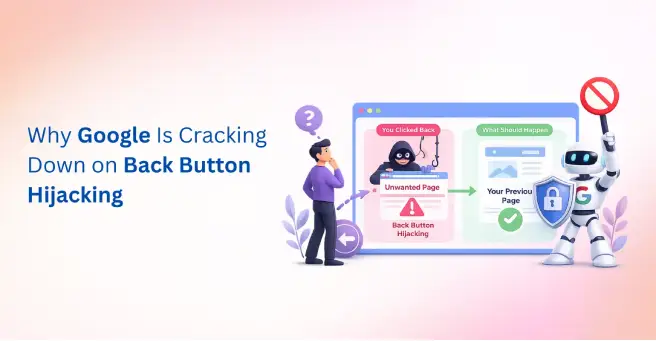
Imagine this: you land on a webpage, decide it is not what you were looking for, and hit the back button. But instead of returning to Google, you are sent right back to the same page or to a different page on the same site. You try again. Same result. You are stuck. This frustrating experience has a name: back button hijacking.
Back button hijacking is a deceptive browser navigation tactic where a website manipulates your browser’s history stack, making it impossible or difficult to leave the site using the standard back button. It is a black-hat UX trick that has been used to inflate engagement metrics, boost ad impressions, and trap users into viewing content they did not intend to see.
For years, this tactic flew under the radar. But that era is over. Google’s evolving spam policies and Page Experience signals now explicitly target deceptive navigation practices. Websites using back button hijacking risk manual penalties, algorithmic ranking drops, and a serious loss of user trust.
In this guide, we break down exactly what is back button hijacking, how it works technically, why Google banned it, how to detect it on your site, and most importantly how to fix it before it costs you your rankings.
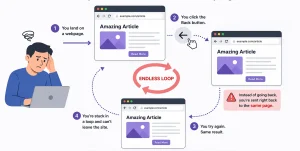
Image Source: AI-generated illustration
What Is Back Button Hijacking And How Does It Work?
What is back button hijacking, technically speaking? At its core, it is the deliberate manipulation of a browser’s session history using JavaScript or server-side redirects, so that pressing the back button does not take the user to the previous page in their browsing session.
Every time you navigate on the web, your browser maintains a history stack, a chronological list of the URLs you have visited. When you press back, the browser pops the most recent entry off that stack and loads the one before it. Back button hijacking exploits this mechanism by silently pushing extra URLs onto that stack, replacing the current history entry with a new one, or intercepting the back navigation event with JavaScript and overriding what should happen next.
The result feels like a revolving door you cannot exit, every time you try to leave, you are pushed back inside. Unlike normal redirects, which serve a legitimate purpose such as pointing old URLs to new ones, back button hijacking has a single goal: to prevent users from leaving the site on their own terms.
It is important to note that this does not always happen with malicious intent. Third-party plugins, ad networks, and poorly written JavaScript frameworks can introduce back button hijacking accidentally. But whether intentional or not, the consequence is the same: a broken, deceptive user experience that Google now actively penalizes.
Common Back Button Hijacking Techniques Websites Use
There are several technical methods behind back button hijacking. Understanding each one helps you audit your own site effectively.
1. History Stack Stuffing
This is the most common method. A website uses JavaScript’s history.pushState() or history.replaceState() API to silently add multiple entries to the browser’s session history. When the user hits back, they cycle through these fake entries instead of leaving the site. The user may press back five or six times before they can actually exit.
2. Meta Refresh Redirect Loops
Some websites abuse the <meta http-equiv=”refresh”> HTML tag to automatically reload or redirect the page after a set number of seconds. When combined with back navigation, this creates an infinite loop, the user is bounced back and forward between pages, never escaping the site.
3. JavaScript popstate Event Listener Abuse
When a user presses the back button, the browser fires a popstate event. Legitimate developers use this to manage single-page application (SPA) navigation. Hijackers, however, attach a popstate listener that intercepts the event and cancels or overrides the natural back navigation keeping the user pinned to the current page.
4. Forced Redirect on Back Navigation
Some sites detect when a user is navigating backwards and immediately fire a JavaScript redirect to a different page on the same site often a sign-up page, a promotional offer, or an ad-heavy landing page. The user never makes it back to the search results page.
5. Exit-Intent Popups That Override Back Navigation
Legitimate exit-intent popups detect when a user’s cursor moves toward the browser’s back button and display an overlay. Hijacked versions, however, go further they use JavaScript to override the back button itself, preventing the browser from navigating away until the popup is dismissed. This crosses the line from UX into manipulation.
Why Do Websites Use Back Button Hijacking?
If back button hijacking is so harmful to users, why do websites still use it? The answer is short-term metrics. Here is what site owners and developers hope to gain from this tactic:
| Goal | Short-Term Benefit | Long-Term Consequence |
|---|---|---|
| Reduce bounce rate | Lower bounce metrics | Misleading analytics |
| Increase session time | Higher engagement stats | Poor user trust |
| Boost ad impressions | More revenue | Google penalties |
| Force conversions | Temporary leads | Lower retention |
| Block competitors | Delayed exit | Negative UX signals |
These motivations are understandable from a short-term perspective. But the math does not work in the long run. Artificially inflated metrics do not convert. Angry, trapped users do not become loyal customers. And since Google has now built detection for these patterns into its ranking signals, the SEO cost far outweighs any temporary gain.
Why Google Banned Back Button Hijacking
On April 16, 2026, Google made it official. Google’s Search Central Blog confirmed that inserting deceptive or manipulative pages into a user’s browser history has always been against the Google Search Essentials and has now expanded its spam policies to address back button hijacking as an explicit violation under the “malicious practices” category, meaning it can now trigger direct spam actions.
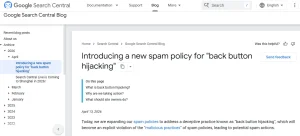
Image Source: Screenshot taken from Google Search Central Blog.
The reasoning is rooted in user expectation. When a user clicks the back button, they have a clear expectation: they want to return to the previous page. Back button hijacking breaks this by interfering with browser navigation sending users to pages they never visited, presenting unsolicited ads, or simply preventing them from leaving. Google noted that people report feeling manipulated and eventually less willing to visit unfamiliar sites.
Back button hijacking sits under the Malicious Practices clause of Google’s Spam Policies. Google defines malicious practices as those that create a mismatch between user expectations and the actual outcome, leading to a negative and deceptive user experience.
Google’s detection goes beyond crawling. The Chrome UX Report (CrUX) reflects how real-world Chrome users experience websites, and this data is used by Google Search to directly inform the page experience ranking factor. Abnormal back-navigation patterns from real users become measurable quality signals against your domain.
On penalties: Google issues a manual action after human reviewers determine that a site’s pages are engaged in spam as described in the Search Essentials. This can result in affected pages or the entire domain being removed from search results. Importantly, Google reminds site owners that back button hijacking originating from third-party libraries or ad platforms is not an excuse site owners are responsible for reviewing and removing any code causing it.
How Back Button Hijacking Hurts Your SEO and Search Rankings
The SEO damage from back button hijacking is not hypothetical. It operates across multiple ranking factors simultaneously, creating a compounding negative effect on your site’s visibility.
Manual Action: Deceptive Site Behaviour
Google’s spam reviewers actively look for sites that use manipulative navigation tactics. If your site is flagged, you will see a manual action notification in Google Search Console. This can result in specific pages or your entire domain being removed from Google’s index.
Pogo-Sticking and Behavioural Signals
Pogo-sticking – when a user clicks your result in Google, immediately leaves, and clicks another result, is a strong negative quality signal. Back button hijacking can trigger unusual versions of this pattern, where users furiously click back multiple times before escaping, sending a clear signal to Google that your page failed to satisfy search intent.
Core Web Vitals and Page Experience Penalties
Interaction to Next Paint (INP) and Cumulative Layout Shift (CLS) are two Core Web Vitals metrics that back button hijacking can negatively affect. JavaScript-heavy history manipulation increases INP scores and can cause layout shifts, both of which reduce your Page Experience score.
Loss of Crawl Trust
When Googlebot encounters redirect loops or unusual history manipulation patterns during crawling, it may reduce the crawl budget allocated to your site. This means fewer of your pages get crawled and indexed, a serious problem for large sites.
Back Button Hijacking vs. Ethical UX Tactics
| Tactic | Ethical? | Google-Safe? | Affects Rankings? | Recommended Alternative |
|---|---|---|---|---|
| Back button redirect | No | No | Negative | Internal linking |
| History stuffing | No | No | Negative | Content hubs |
| Meta refresh loop | No | No | Negative | 301 redirects |
| Exit popup (non-blocking) | Yes | Yes | Neutral | Keep as-is |
| Sticky CTA | Yes | Yes | Positive | Optimize UX |
| Related content widget | Yes | Yes | Positive | Scale site structure |
How to Check If Your Website Has Back Button Hijacking Issues
Detecting back button hijacking on your own site requires both manual testing and technical audit tools. Here is a practical step-by-step approach:
1. Manual Back Button Test
Visit your own website from Google Search results. Navigate to a few pages. Then press the browser back button and observe what happens. If you are returned to the same page, redirected to a different internal page, or if the back button requires multiple presses to exit, you likely have a back button hijacking issue.
2. Chrome DevTools – History Stack Inspection
Open Chrome DevTools (F12), go to the Application tab, and inspect Session Storage. Also monitor the Console for any JavaScript errors or pushState calls being fired unexpectedly. You can also use the Network tab to watch for redirect chains triggered on back navigation.
3. Review Your JavaScript Files
Search your JavaScript codebase for the following patterns:
- pushState() — check if it is being called without a legitimate SPA navigation purpose
- replaceState() — verify it is not overwriting genuine history entries
- addEventListener(‘popstate’) — confirm the listener is not cancelling or overriding back navigation
- onbeforeunload — make sure it is not preventing navigation departure
4. Audit Plugins and Third-Party Scripts
Many WordPress plugins, particularly exit-intent, popup, and push notification tools, introduce history manipulation unintentionally. Deactivate plugins one by one and retest back navigation after each deactivation to isolate the culprit.
5. Check Google Search Console
Log into Google Search Console and navigate to Security and Manual Actions. Any deceptive site behaviour flag will appear here. Even if no manual action exists yet, look for unusual drops in impressions or crawl errors in the Coverage report.
How to Fix Back Button Hijacking on Your Website
Fixing back button hijacking requires a systematic approach. Follow these steps in order to clean up your site and restore normal navigation behaviour:
Step 1: Audit all JavaScript files for pushState and popstate misuse. Remove or rewrite any code that manipulates browser history without a legitimate single-page application reason.
Step 2: Deactivate and reconfigure exit-intent or popup plugins. Replace aggressive plugins with ones that display overlays without overriding the browser’s back function. Always ensure the back button still works correctly after any popup is triggered.
Step 3: Replace meta refresh loops with proper 301 server-side redirects. A 301 redirect is clean, crawlable, and passes link equity. A meta refresh loop is none of those things.
Step 4: Test your site’s back navigation on both desktop and mobile browsers after every JavaScript or plugin change. Mobile back navigation is even more critical given Google’s mobile-first indexing.
Step 5: If you have received a manual action from Google, fix all deceptive navigation issues first, then submit a reconsideration request through Google Search Console explaining the changes made.
Step 6: Document all redirect rules and JavaScript navigation logic in a shared developer notes file. This prevents future developers or plugin updates from accidentally reintroducing the same problems.
| Pro Tip |
|---|
| Even legitimate exit-intent popups can trigger back button hijacking flags if they override the browser’s native back function. Always test your popups in incognito mode across Chrome, Firefox, and Safari. Verify that the back button returns users to their previous page correctly after any popup interaction. |
Ethical Ways to Reduce Bounce Rate Without Hijacking Navigation
The goal behind back button hijacking keeping users engaged is legitimate. The method is not. Here are white-hat alternatives that improve engagement without risking a Google penalty:
| Strategy | How It Works | SEO Impact | Why It’s Safe |
|---|---|---|---|
| Internal linking & related content | Guides users to relevant pages naturally | Improves session depth | No forced navigation |
| Exit-intent popups (non-blocking) | Triggers when user is about to leave | Captures attention without disruption | Does not override back button |
| Improve page speed (Core Web Vitals) | Faster load reduces frustration exits | Boosts rankings + UX signals | Fully aligned with guidelines |
| Sticky CTA & scroll offers | Adds visible but non-intrusive actions | Increases engagement | User retains control |
| Content hubs & pillar pages | Encourages deeper exploration | Builds topical authority | Organic navigation flow |
| A/B testing (e.g., Optimize/VWO) | Improves UX through experimentation | Better conversion rates | No manipulation involved |
Conclusion
Understanding what is back button hijacking is the first step toward protecting your site from one of Google’s increasingly enforced spam categories. What once passed as a clever UX workaround is now a clearly documented violation of Google’s Search Essentials and the technical tools Google has to detect it are more sophisticated than ever.
The core lesson is simple: manipulating user navigation may produce short-term metric gains, but it destroys user trust, distorts your real analytics data, and puts your entire search presence at risk. Google rewards sites that prioritize genuine user experience and penalizes those that use deception to fake it.
If you are unsure whether your website has deceptive navigation issues, redirect loops, or technical SEO problems that could be quietly draining your rankings, Tangence can help. With over two decades of experience as a full-service digital marketing and SEO services agency, Tangence conducts in-depth technical SEO audits that uncover issues like back button hijacking, Core Web Vitals violations, crawl errors, and more before Google does.
Frequently Asked Questions
Q1: What is back button hijacking in simple terms?
Back button hijacking is when a website manipulates your browser’s history so that pressing the back button keeps you on the same site instead of returning you to the previous page.
Q2: Is back button hijacking illegal?
It is not always illegal, but it violates Google’s spam policies and constitutes a deceptive user experience, which can result in manual penalties or algorithmic ranking drops.
Q3: Can back button hijacking happen accidentally?
Yes. Certain exit-intent popup plugins or JavaScript frameworks can unintentionally trigger history stack manipulation without the developer’s awareness. Regular audits are essential.
Q4: How does Google detect back button hijacking?
Google uses a combination of Chrome UX data, Googlebot crawl behaviour analysis, and Page Experience signals to identify abnormal navigation patterns consistent with back button hijacking.
Q5: What is the penalty for back button hijacking from Google?
Sites found using back button hijacking may receive a manual action for deceptive behaviour, leading to significant ranking drops or complete de-indexing in severe cases.
Q6: Does back button hijacking affect mobile SEO?
Yes, mobile users are disproportionately affected since mobile back navigation is a primary UX behaviour. This can worsen Core Web Vitals signals and harm mobile-first indexing rankings.
Q7: How do I prevent back button hijacking on my WordPress site?
Audit all installed plugins, especially exit-intent or popup tools. Review custom JavaScript for pushState or popstate event misuse, and test your site’s back navigation manually after every major update.