

blog
What Are Orphan Pages in SEO? Why They Hurt Rankings & How to Fix Them

Did you know that a significant portion of the pages on most websites are invisible to Google? Not because of a technical error, not because of a penalty but simply because no other page links to them. These forgotten pages are known as orphan pages, and they are one of the most overlooked problems in SEO.
Orphan pages in SEO are web pages that exist on your website but have no internal links pointing to them from any other page. Because search engine crawlers like Googlebot discover new content by following links, a page with no inbound internal links is effectively invisible to the crawler. It may never get indexed, never earn rankings, and never drive organic traffic even if the content itself is excellent.
In this guide, you will learn exactly what orphan pages are, why they silently damage your SEO performance, how to find them using both free and paid tools, and how to fix them with a clear, decision-based framework. Whether you manage a small blog or a 10,000-page e-commerce store, this guide covers everything you need to turn orphaned content into a ranking asset.
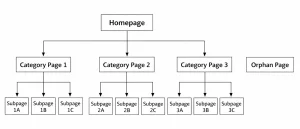
Image Source: Custom illustration
What Are Orphan Pages in SEO?
Before you can fix a problem, you need to understand exactly what it is. The term sounds dramatic, but the concept is straightforward.
What Exactly Is an Orphan Page?
| Definition
An orphan page is any page on a website that has zero internal links pointing to it from other pages on the same site. Because search engines crawl the web by following links, an orphan page is effectively invisible to crawlers unless it is discovered through an XML sitemap or an external backlink. |
The word “orphan” is apt: the page exists, but it has no parent, no siblings, no connections within your site’s link ecosystem. It is stranded.
Orphan Pages vs. Dead-End Pages vs. Broken Pages
These three page types are often confused with one another. Here is how they differ:
| Type | Definition | Googlebot Finds It? | SEO Risk |
|---|---|---|---|
| Orphan Page | No internal links pointing to it | Maybe (via sitemap only) | High |
| Dead-End Page | Has inbound links but no outbound links | Yes | Medium |
| Broken Page | Returns 404 or 5xx error | Yes, but errors out | High |
The key distinction is discoverability. A dead-end page can still be found and indexed; it just does not pass link equity forward. An orphan page may not be found at all.
Types of Orphan Pages: Intentional vs. Accidental
Intentional orphan pages are pages you deliberately keep disconnected. For example, paid advertising landing pages, private client portals, or beta features not yet ready for public linking. These are generally fine, provided they are noindexed or otherwise protected from public crawling.
Accidental orphan pages are the problem. These are pages that were once connected to your site but lost their links through a redesign, migration, or content deletion. They are the pages this guide is about.
Why Orphan Pages in SEO Are a Silent Traffic Killer
Orphan pages do not cause immediate, visible penalties. That is precisely what makes them dangerous. They quietly erode your SEO performance in the background while you focus on content and link building. Here is how.
Googlebot Cannot Discover What It Cannot Reach
Google’s primary crawl mechanism is link-following. Googlebot starts at known URLs and follows links to discover new pages. A page with no inbound links is simply not on the map. Even if the page contains high-quality, keyword-rich content, it cannot rank for anything if Google does not know it exists.
While Google may occasionally discover orphan pages through your XML sitemap or external backlinks, relying on these routes is unreliable. Sitemaps signal existence; internal links signal importance.
Lost Link Equity and PageRank Dilution
Internal links are how PageRank flows through your website. When Page A links to Page B, it passes a portion of its authority to Page B. Orphan pages receive none of this equity. They sit outside the authority network entirely, which means even if you later add a few backlinks to them, the full compounding benefit of your site’s internal authority structure is lost.
Wasted Crawl Budget on Large Sites
For websites with thousands of pages, Google allocates a finite crawl budget, the number of pages it will crawl within a given timeframe. If orphan pages exist in large numbers (common after migrations), they can consume crawl budget without contributing rankings. Meanwhile, your high-value pages may be crawled less frequently.
Impact on Topical Authority and Site Architecture
Modern SEO rewards topical authority, the idea that your site comprehensively covers a subject through interlinked, related content. Orphan pages break the topical web. A great blog post on a subtopic that nothing links to does not contribute to your site’s perceived authority on that topic. It is expertise that Google cannot see.
Common Causes of Orphan Pages And How They Sneak In
Understanding where orphan pages come from helps prevent them from recurring after fixes.
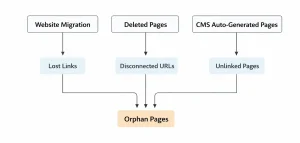
Image Source: Custom illustration
1. Website Migrations and Redesigns
This is the most common cause. During redesigns or platform migrations, navigation structures change. Pages previously linked in menus or content hubs may lose their connections. As a result, many pages become orphaned overnight without being noticed.
2. CMS Auto-Generated Pages
Platforms like WordPress and Shopify automatically create pages that are often overlooked. These include tag archives, author pages, media attachments, or product variant URLs. Since they are not manually linked, they frequently become orphan pages by default.
3. Deleted Navigation or Category Pages
When a category or menu item is removed, all pages linked through it lose their internal links. This often happens during navigation simplification, leaving multiple pages isolated unintentionally.
4. Expired Campaign Landing Pages
Landing pages created for ads remain live even after campaigns end. Without internal links, they become orphaned and contribute no SEO value.
5. Pagination and Filter URL Issues
E-commerce sites generate multiple URLs through filters. Without proper control, these pages become isolated and waste crawl budget.
How to Find Orphan Pages in SEO (Step-by-Step)
Finding orphan pages in SEO requires comparing what your site crawler can discover through links against the full list of URLs your site contains. Here are five proven methods, from beginner-friendly to advanced.
| Tool | Free / Paid | Best For | Ease of Use |
|---|---|---|---|
| Screaming Frog | Free (up to 500 URLs) / Paid | Crawl + sitemap comparison | Intermediate |
| Google Search Console | Free | Impression vs. link gap | Beginner |
| Ahrefs Site Audit | Paid | Automated orphan reports | Beginner–Intermediate |
| Semrush Site Audit | Paid | Large sites, scheduled crawls | Intermediate |
| Sitebulb / Lumar | Paid | Enterprise-level audits | Advanced |
Method 1: Crawl + Sitemap Comparison (Screaming Frog)
This is the most reliable method and works for any size site.
- Open Screaming Frog and run a full crawl of your website. Allow it to complete fully.
- Export all crawled URLs: go to Export > All Inlinks and save as CSV.
- Download your XML sitemap from yoursite.com/sitemap.xml or via Google Search Console.
- In a spreadsheet (Excel or Google Sheets), use VLOOKUP or conditional formatting to compare the two lists. URLs present in the sitemap but absent from the crawl are candidate orphan pages.
- Cross-reference further: in Screaming Frog, go to Reports > Orphan Pages if you have connected your sitemap under Configuration > Crawl > XML Sitemap. The tool will flag these automatically.
This method catches the most orphan pages because it compares the authoritative record of your site (the sitemap) against what a crawler can actually reach.
Method 2: Google Analytics + Search Console Cross-Reference
This method is particularly useful for finding orphan pages that are receiving traffic or impressions, pages worth recovering immediately.
- In Google Search Console, go to the Coverage report and export all indexed URLs.
- In Ahrefs or Screaming Frog, run a crawl and export all internally linked pages.
- Compare: any URL appearing in GSC (indexed) but not appearing in your crawl data (not linked) is an orphan receiving impressions. These are high-priority fixes.
- In Google Analytics, check Behavior > All Pages for URLs with organic traffic but no referral paths from internal links.
Method 3: Ahrefs or Semrush Site Audit
Both tools offer automated orphan page detection within their site audit modules, making this the fastest option for paid subscribers.
- In Ahrefs: run a Site Audit, then navigate to the Pages report. Filter for Pages with no internal links pointing to them.
- In Semrush: run a Site Audit, then check the Issues report for “Pages not linked internally.”
- Both tools allow you to schedule recurring crawls, enabling automated monthly orphan page monitoring without manual effort.
Method 4: Sitebulb or Lumar for Enterprise Sites
For enterprise websites with 50,000+ URLs, Sitebulb and Lumar (formerly DeepCrawl) offer the depth and scalability needed. Both provide visual link graphs that make it easy to spot disconnected clusters of pages & not just individual orphans. Lumar is particularly effective for multi-region, multi-language sites.
Method 5: Manual Log File Analysis
The most advanced method and the most revealing. Your server logs record every URL that Googlebot has crawled. By exporting your log files and filtering for Googlebot activity, you can see precisely which pages Google is visiting and how frequently. Pages that appear rarely or never in log data but exist in your CMS are strong orphan candidates.
How to Fix Orphan Pages in SEO: A Decision Framework
Not every orphan page deserves the same treatment. The right fix depends on the page’s value, whether it has existing traffic or backlinks, and whether its content is unique. Use this framework to prioritize and act.
| Page Value | Duplicate Content? | Has Traffic/Links? | Recommended Action |
|---|---|---|---|
| High | No | Yes | Add internal links |
| High | No | No | Add links + add to sitemap |
| Medium | Partial | No | Consolidate or 301 redirect |
| Low | Yes | No | Delete or 301 redirect |
| Intentional | N/A | N/A | Noindex + password protect |
Option 1: Add Internal Links
For the majority of orphan pages, especially those with good content and no duplicate issues. the fix is simply to link to them from relevant pages already within your site’s link graph.
How to Identify the Best Linking Sources
Open the orphan page and identify its primary topic and target keyword. Then search your site for pages already covering related topics. Use a site search query like: site:yoursite.com “related keyword” to find candidates. The best linking page is one that is topically relevant, already well-indexed, and carries reasonable internal authority.
Anchor Text Best Practices
Use descriptive, keyword-rich anchor text rather than generic phrases like “click here” or “read more.” For an orphan page targeting “content audit services,” a good anchor text would be “content audit services” or “how we conduct content audits” – contextually embedded in a natural sentence. Avoid over-optimization; match the anchor to the phrasing your audience would use.
Option 2: Add to Site Navigation or Footer
If an orphan page is a core service page, a pillar content piece, or a frequently visited resource, it belongs in your primary navigation, footer, or sidebar. Navigation links are crawled on every page load, making them the most powerful internal linking mechanism available. A page linked from the footer of every page on your site is the opposite of an orphan.
Option 3: Add to Your XML Sitemap and Submit to GSC
While a sitemap alone does not pass link equity, it does ensure Google has a record of the page’s existence and can crawl it. For pages you want indexed quickly, particularly after a migration where internal links have not been fully restored – adding the URL to your sitemap and requesting indexing via Google Search Console’s URL Inspection tool is a useful interim step.
Option 4: Consolidate, Redirect, or Delete
Some orphan pages simply should not exist. Use these decision rules:
- 301 Redirect: Use this when the orphan page covers a topic already handled by a stronger page. Redirect the orphan to the closest topical match to consolidate link equity and avoid duplicate content.
- Noindex: Use this for pages that need to remain accessible (client portals, campaign pages) but should not rank in search results.
- Delete (410): Use this for pages with no content value, no backlinks, no traffic, and no realistic use case. A 410 (Gone) status code tells Google the page is permanently removed and to stop crawling it.
Preventing Orphan Pages: Build an SEO-Proof Site Structure
The best fix is prevention. Once you resolve existing orphan pages, implement systems to stop new ones from appearing.
Publish with a Linking Requirement
Add an internal linking check before publishing any page. Ensure each new page is linked from at least two relevant existing pages. This improves structure, relevance, and overall SEO quality.
Build and Maintain a Content Hub Structure
Use topic clusters with pillar pages and supporting content. Each cluster page links back to the pillar, creating a strong internal network that prevents isolation.
Automate Monthly Orphan Page Audits
Set up scheduled crawls in tools like Ahrefs or Semrush. Enable alerts to detect orphan pages early and fix them proactively.
Use a Migration Checklist
Before redesigns or migrations, map all internal links and verify them post-launch. This prevents large-scale orphan page issues.
Final Thoughts
Orphan pages in SEO are deceptively simple to understand but surprisingly easy to accumulate. Every redesign, every migration, every expired campaign, and every CMS update is an opportunity for valuable content to lose its connections and disappear from Google’s view.
The fix is equally straightforward when approached systematically. Find them by comparing your crawl data against your sitemap. Fix them by adding internal links, updating navigation, consolidating duplicates, or removing what is no longer needed. Prevent them by building a content structure and publishing workflow that treats internal linking as a first-class SEO requirement.
If your site has hundreds or thousands of pages, manual orphan page audits are time-consuming and easy to get wrong. At Tangence, our technical SEO audits include a comprehensive orphan page analysis as standard, identifying disconnected content, mapping internal linking gaps, and delivering a prioritized fix plan your team can act on immediately.
Tangence offers end-to-end SEO services, ensuring that everything from technical fixes to content optimization and internal linking strategy works together to drive measurable results.
Frequently Asked Questions
1. What are orphan pages in SEO?
Orphan pages in SEO are web pages that exist on a website but are not linked to from any other page within the same domain. Since search engines primarily discover content through internal links, these pages often remain hidden from crawlers. As a result, they may not get indexed or ranked, even if the content is valuable and optimized.
2. Do orphan pages affect SEO rankings?
Yes, they can significantly impact SEO performance. Orphan pages do not receive internal link equity (PageRank), which is a crucial ranking factor. They are also harder for search engines to discover, reducing their chances of ranking. Additionally, they weaken your site’s overall topical authority and can lead to inefficient crawl budget usage, especially on large websites.
3. How do I find orphan pages on my website?
You can identify orphan pages by comparing data from a site crawler and your XML sitemap. Tools like Screaming Frog, Ahrefs, or Semrush can crawl your site and list all internally linked pages. Any URL present in your sitemap but missing from the crawl data is likely an orphan page.
4. Can a page in the sitemap still be an orphan page?
Yes. A page can be included in the XML sitemap but still be considered an orphan if no internal links point to it. While Google may discover it through the sitemap, the lack of internal links signals low importance and limits its ability to rank effectively.
5. Should I delete or fix orphan pages?
It depends on the page’s value. High-quality pages with traffic or backlinks should be fixed by adding internal links. Low-value or outdated pages should either be merged, redirected (301), or removed (410 status).
6. How often should I audit for orphan pages?
Quarterly audits are ideal for most websites. However, high-content or eCommerce sites should perform monthly checks or audit after major changes.
7. Are all orphan pages bad?
Not always. Some are intentional, like ad landing pages or private content. The issue lies in accidental orphan pages that were meant to rank but remain disconnected.