-01.svg) SEO Services
SEO Services-02.svg) Local SEO Services
Local SEO Services-03.svg) AI SEO Services
AI SEO Services-04.svg) Technical SEO Services
Technical SEO Services-05.svg) Performance Marketing
Performance Marketing-06.svg) Social Media
Social Media-07.svg) Content Marketing
Content Marketing-08.svg) Web Development
Web Development-09.svg) App Development
App Development-10.svg) Marketing Automation
Marketing Automation-11.svg) Real Estate
Real Estate-12.svg) Ecommerce
Ecommerce-13.svg) Education
Education-14.svg) Healthcare
Healthcare B2B
B2B SAAS
SAAS Law Firm
 BFSI
BFSI Renewable Energy
 Tour and Travel
blog
How to Fix W3C Validation Errors (Step-by-Step Guide for SEO in 2026)
If you have ever run your website through the W3C Markup Validation Service, you know the sinking feeling that comes with a wall of red errors. For many site owners and SEO professionals, these errors feel like a technical maze with no clear exit. But here is the good news, learning how to fix W3C validation errors is a structured, repeatable process, and getting it right can meaningfully improve your site’s crawlability, accessibility, and overall search performance.
In this step-by-step guide, we will walk you through everything: what W3C validation errors actually are, why they matter for SEO in 2026, the most common error types you will encounter, and a precise workflow to resolve each one. Whether you are a developer, an in-house SEO, or a business owner managing your own website, this guide gives you the clarity and confidence to tackle HTML and CSS validation errors head-on.
| Quick Stat |
|---|
| According to the Web Almanac report, over 96% of crawled homepages contain at least one HTML validation warning or error, making it one of the most widespread yet underaddressed technical SEO issues on the web. |
What Are W3C Validation Errors and Why Should You Care?
The World Wide Web Consortium (W3C) is the international body that sets the standards for HTML, CSS, and other web technologies. Their free online tool, the W3C Markup Validation Service – checks whether your web pages conform to these published standards.
When your code deviates from these standards, the validator flags it as either a warning (low severity) or an error (must fix). These issues range from unclosed HTML tags and deprecated attributes to malformed schema markup and duplicate IDs. These things affect how browsers, search engine crawlers, and assistive technologies interpret your pages.
From an SEO standpoint, Google’s crawlers are remarkably good at parsing imperfect HTML. However, validation errors can still cause real problems:
| Issue Caused by Errors | Impact on SEO |
|---|---|
| Broken DOM structure | Prevents proper crawling and indexing |
| Duplicate IDs | Breaks JavaScript & structured data parsing |
| Deprecated tags | Reduces accessibility & trust signals |
| Invalid schema markup | Stops rich snippets from appearing |
| CSS errors | Causes layout shifts (affects Core Web Vitals) |
| E-E-A-T Note |
|---|
| Google’s Search Quality Evaluator Guidelines emphasise page experience and technical trustworthiness. A website with multiple HTML validation errors signals poor technical quality, which goes against the principles of Expertise, Experience, Authoritativeness, and Trustworthiness (E-E-A-T). |
How to Fix W3C Validation Errors
Fixing W3C validation errors is a step-by-step process that starts with running your website through the W3C validator to identify issues. Next, prioritise and fix critical errors like broken HTML structure, duplicate IDs, and invalid schema markup. Finally, validate your fixes and implement a regular workflow to maintain clean, standards-compliant code.
Step 1:- Run a Full W3C Validation Audit
Before you fix anything, you need a complete picture of what you are dealing with. Here is how to perform a thorough audit:
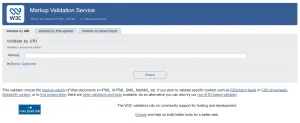
Image Source: Screenshot taken from W3C Markup Validation Tool.
Using the W3C Markup Validation Service
- Navigate to validator.w3.org.
- Choose between Validate by URI (for live URLs), Validate by File Upload, or Validate by Direct Input (paste HTML).
- Run the check and download the full error report.
- Repeat for all key templates: homepage, product pages, blog posts, and category pages.
Using Browser Developer Tools
Chrome DevTools (F12) and Firefox Developer Edition flag inline HTML issues in real time. Use the Console tab to spot JavaScript-generated DOM errors that the W3C validator may not catch from a static crawl.
Scaling with Crawl Tools
For large sites, use Screaming Frog SEO Spider (enable the Custom Extraction feature to flag HTML errors at scale) or integrate W3C API calls into your CI/CD pipeline so new deployments are validated automatically before going live.
Step 2:- Understand the Error Types
Not all W3C validation errors carry equal weight. Before you start fixing, categorise your error list:
| Error Type | Common Examples | SEO Impact |
|---|---|---|
| Critical (Errors) | Unclosed tags, duplicate IDs, invalid nesting | High – can break crawlability and prevent proper indexing |
| Moderate (Errors) | Deprecated attributes, missing alt text, incorrect ARIA roles | Medium – impacts accessibility and E-E-A-T signals |
| Low (Warnings) | Obsolete HTML elements, empty headings | Low – mostly cosmetic but improves code quality over time |
| Schema Errors | Malformed JSON-LD, incorrect @type values | High – prevents rich results from appearing in SERPs |
Step 3:- Fix the Most Common W3C Validation Errors
Now we get into the hands-on work. Below are the most frequently encountered HTML validation errors and their exact fixes.
1. Unclosed or Improperly Nested Tags
This is the single most common validation error across the web. Every opening tag needs a corresponding closing tag, and they must be properly nested (LIFO order – last opened, first closed).
| Wrong: <div><p>Text</div></p> |
| Correct: <div><p>Text</p></div> |
2. Duplicate ID Attributes
ID values must be unique per page. Duplicate IDs break anchor links, interfere with JavaScript selectors, and can corrupt structured data parsing. Audit your source code for repeated id= attributes and convert duplicates to class= attributes instead.
3. Missing or Incorrect DOCTYPE Declaration
Every modern HTML page should begin with <!DOCTYPE html>. Missing or outdated DOCTYPE declarations (such as HTML4 transitional doctypes) cause browsers to enter quirks mode, which can trigger cascading rendering and validation failures.
4. Missing Alt Attributes on Images
The W3C and WCAG both require all <img> elements to carry an alt attribute. Beyond accessibility compliance, missing alt text means Google’s image crawler cannot understand image context, a direct loss of SEO equity. Add descriptive, keyword-aware alt text to every image.
5. Invalid or Deprecated Attributes
Attributes like align=, bgcolor=, border= on tables, and similar presentational HTML4 attributes are deprecated in HTML5. Replace them with CSS equivalents. For example, replace <table border=’1′> with CSS border properties.
6. Missing Required Attributes
Some elements have mandatory attributes. The <a> tag needs an href, <script> elements need a type or src, and form inputs need a name or id. The W3C validator will flag any missing required attribute clearly.
7. Malformed JSON-LD Structured Data
Schema markup errors are technically HTML validation issues when the JSON-LD block is malformed. Common mistakes include unclosed brackets, trailing commas, and using the wrong @type value. Use Google’s Rich Results Test alongside the W3C validator to audit your structured data.
Step 4:- Fix CSS Validation Errors
CSS validation errors are checked separately at jigsaw.w3.org/css-validator. Common CSS issues that affect page rendering and indirectly hurt SEO include:
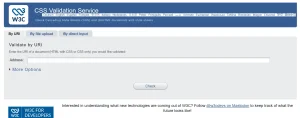
Image Source: Screenshot taken from W3C Markup Validation Tool.
- Unknown property names (often caused by vendor prefixes without fallbacks).
- Invalid value declarations (e.g., using px where a unitless value is required).
- Duplicate selectors that create specificity conflicts causing layout shifts – a direct Core Web Vitals risk.
- Missing semicolons that break entire rule blocks.
When you fix w3c validation errors in CSS, prioritise any rule that affects above-the-fold content, as layout shifts there directly impact Cumulative Layout Shift (CLS) scores, a key ranking signal.
Step 5:- Validate Schema Markup Separately
Structured data deserves its own validation step. Even if your HTML passes the W3C checker, malformed schema can silently kill your rich snippet eligibility. Use:
- Google Rich Results Test (search.google.com/test/rich-results) – confirms eligibility for rich results.
- org Validator (validator.schema.org) – checks @type accuracy and property completeness.
- Google Search Console > Enhancements – shows live schema errors for indexed pages.
Pay special attention to FAQPage, Article, Product, and LocalBusiness schema types, as these are most commonly misconfigured and most valuable for SERP visibility.
Step 6:- Implement a Validation Maintenance Workflow
Fixing W3C validation errors is not a one-time task. Code updates, CMS plugin changes, and third-party script injections regularly introduce new errors. Build validation into your regular workflow:
- Run a full W3C audit after every major site update or CMS upgrade.
- Add W3C validation to your pre-launch checklist for new pages and templates.
- Connect Screaming Frog to the W3C API for automated crawl-based validation at scale.
- Set up monthly monitoring via Google Search Console’s Core Web Vitals and Coverage reports to catch regressions early.
- If using a CMS like WordPress, audit your plugins quarterly, poorly coded plugins are one of the leading sources of new HTML errors on managed sites.
| Pro Tip |
|---|
| If your site uses a page builder (Elementor, Divi, WPBakery), run the W3C validator on builder-generated pages specifically. These tools often generate non-standard HTML that can silently accumulate validation errors over time. |
W3C Validation Errors vs. SEO: What Google Actually Cares About
A common question in the SEO community is whether Google really penalises sites for failing W3C validation. The nuanced answer is: not directly, but indirectly, yes.
Google’s John Mueller has confirmed that the search engine does not use W3C validation as a direct ranking factor. However, the downstream effects of unresolved HTML errors, broken DOM structures, inaccessible content, slow rendering, poor mobile experience, and invalid schema are all things Google measures and ranks against.
In 2026, with Google’s continued investment in AI-powered search and the expansion of Search Generative Experience (SGE), clean, well-structured HTML is more important than ever. AI overviews and rich results both depend on accurate, machine-readable markup. Sites that consistently fix w3c validation errors maintain a technical foundation that supports every other SEO initiative – from link building to content optimisation.
Tools to Fix W3C Validation Errors Efficiently
Here is a consolidated toolkit for your validation workflow:
| Tool | Best For | Cost |
|---|---|---|
| W3C Markup Validator | HTML error detection | Free |
| W3C CSS Validator | CSS rule validation | Free |
| Screaming Frog SEO Spider | Large-scale crawl audits | Freemium |
| Google Rich Results Test | Schema markup validation | Free |
| Chrome DevTools | Real-time DOM debugging | Free |
| Semrush / Ahrefs Site Audit | Combined technical SEO and validation | Paid |
Conclusion
Learning how to fix W3C validation errors is one of the most high-leverage technical SEO investments you can make. While it may not produce overnight ranking jumps, resolving HTML and CSS validation errors removes invisible friction from your site’s crawlability, accessibility, structured data, and page experience, the cumulative effect of which compounds significantly over time.
If you want to fix w3c validation errors at scale or need a comprehensive technical SEO audit that goes beyond validation – Tangence is here to help. As a full-service digital marketing and SEO services agency with over two decades of experience, Tangence specialises in technical SEO, on-page optimisation, and structured data implementation for businesses of all sizes.
Frequently Asked Questions
1. Do W3C validation errors directly affect Google rankings?
Not directly. Google does not use W3C compliance as a confirmed ranking signal. However, the technical problems caused by unresolved HTML and CSS errors, such as broken DOM structures, inaccessible content, and invalid schema – do affect factors Google does rank on, including page experience, crawlability, and rich result eligibility.
2. How do I fix w3c validation errors in WordPress?
Start by running your WordPress pages through validator.w3.org. Most errors originate from themes or plugins generating non-standard HTML. Update all plugins and your theme to their latest versions, then use a child theme to override problematic template files. If errors persist in theme output, consider switching to a standards-compliant theme like GeneratePress or Kadence.
3. What is the difference between a W3C error and a W3C warning?
Errors indicate code that violates the HTML or CSS specification and must be corrected. Warnings flag practices that are technically valid but potentially problematic or outdated. Prioritise fixing all errors first, then address warnings that relate to accessibility or structured data.
4. Can W3C validation errors affect my Core Web Vitals scores?
Yes, indirectly. CSS validation errors can cause duplicate or conflicting style rules that produce unexpected layout shifts, increasing your Cumulative Layout Shift (CLS) score. Similarly, malformed HTML can delay rendering and inflate Largest Contentful Paint (LCP) times, both are direct Core Web Vitals metrics used in Google’s page experience ranking system.
5. How often should I run a W3C validation audit?
Run a full audit after every major code deployment, CMS update, or plugin change. For actively maintained sites, a monthly validation check is a good baseline. Sites that frequently publish new content templates should integrate W3C validation into their pre-publish checklist.
6. Are CSS validation errors as important as HTML errors?
Both matter, but in different ways. HTML validation errors are generally more critical for crawlability and structured data integrity. CSS validation errors are more likely to cause rendering issues, layout shifts, and accessibility failures. Address HTML errors first for SEO impact, then prioritise CSS fixes that affect above-the-fold layout to protect your Core Web Vitals.
7. What are the most common causes of new W3C validation errors appearing on a previously clean site?
The most common sources of newly introduced errors are CMS plugin updates that inject non-standard HTML, third-party script embeds (chat widgets, analytics tags, ad code), page builder-generated markup, and developer changes made without running a post-deployment validation check. Setting up automated validation in your CI/CD pipeline is the most effective way to catch these regressions before they reach production.