-01.svg) SEO Services
SEO Services-02.svg) Local SEO Services
Local SEO Services-03.svg) AI SEO Services
AI SEO Services-04.svg) Technical SEO Services
Technical SEO Services-05.svg) Performance Marketing
Performance Marketing-06.svg) Social Media
Social Media-07.svg) Content Marketing
Content Marketing-08.svg) Web Development
Web Development-09.svg) App Development
App Development-10.svg) Marketing Automation
Marketing Automation-11.svg) Real Estate
Real Estate-12.svg) Ecommerce
Ecommerce-13.svg) Education
Education-14.svg) Healthcare
Healthcare B2B
B2B SAAS
SAAS Law Firm
 BFSI
BFSI Renewable Energy
 Tour and Travel
blog
What Is a Google Penalty? Types, Causes & Recovery Explained
Imagine opening your analytics dashboard on a Monday morning and finding that your organic traffic has dropped by 60% overnight. No warning. No obvious explanation. Just a steep, gut-punch decline in rankings that sends you scrambling for answers. If this scenario sounds familiar, there is a strong chance your website has been hit with a google penalty and understanding exactly what that means is the first step toward getting your rankings back.
A google penalty is a punitive action taken by Google that suppresses a website’s visibility in search results. It can affect a handful of pages or wipe out an entire domain. It can arrive as an official notification in your Search Console, or it can strike silently through an algorithm update, leaving no paper trail at all.
The good news? Penalties are not permanent. Websites recover from them every day but only when the right steps are taken in the right order. In this guide, we will break down every type of google penalty, explain what triggers each one, show you how to confirm whether your site has been penalised, and walk you through a proven, step-by-step recovery process that works in 2026.
Example of a sharp decline in organic traffic, often indicating a Google penalty or algorithmic impact affecting search visibility.
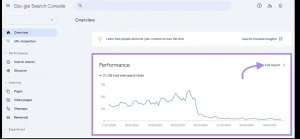
Image Source: Screenshot taken from Google Search Console.
What Is a Google Penalty and Why Does It Happen?
A google penalty is a deliberate restriction applied by Google that reduces or eliminates a website’s presence in search results. It is Google’s way of enforcing its Search Essentials (formerly known as the Webmaster Guidelines), a set of rules that define how websites should be built, maintained, and optimised in order to provide genuine value to users.
When a website violates these guidelines through manipulative link building, low-quality content, deceptive techniques, or other black-hat practices – Google responds by reducing that site’s rankings, either algorithmically or through direct human intervention.
It is critical to understand one important distinction before going any further: a google penalty is not the same thing as an algorithm update. Many website owners panic after a broad core update reshuffles the rankings and assume they have been penalised. In reality, core updates reassess how Google evaluates quality across the board they do not punish specific rule violations. A true penalty is targeted, traceable, and tied to a specific policy breach.
Manual Action Penalty vs. Algorithmic Penalty
There are two fundamental categories of google penalty, and they behave very differently from each other.
| Feature | Manual Action Penalty | Algorithmic Penalty |
|---|---|---|
| Triggered by | Google’s human review team | Automated algorithm |
| Visible in GSC? | Yes – appears in Manual Actions tab | No – only visible through traffic drops |
| Notification | Search Console sends an alert | No notification – you infer it from data |
| Recovery method | Fix issues and submit a reconsideration request | Fix issues and wait for the next algorithm update |
| Recovery time | Typically 2–6 weeks after approval | Can take weeks to months depending on update cycle |
Understanding which category you are dealing with shapes your entire recovery strategy, so this distinction matters enormously.
Types of Google Penalties Every Website Owner Must Know
Now that we understand the two broad categories, let’s explore the specific types of google penalty that can affect your site and what each one looks like in practice.
| Penalty Type | What It Targets | Trigger | Impact Level |
|---|---|---|---|
| Manual Action | Policy violations | Human reviewer | High (can deindex pages/site) |
| Penguin | Unnatural backlinks | Link spam patterns | Medium–High |
| Panda | Thin/duplicate content | Low-quality content signals | Site-wide impact |
| Helpful Content | SEO-first content | Low-value content | Gradual ranking drop |
| SpamBrain | Spam tactics (AI + links) | AI-based detection | Dynamic suppression |
1. Manual Action Penalties
A manual action penalty is the most transparent form of penalty. It is issued by a member of Google’s Search Quality team after a human reviewer concludes that a website is in violation of Google’s spam policies. You will see this clearly in Google Search Console under Security & Manual Actions.
The most common types of manual action penalties include:
- Unnatural inbound or outbound links: Buying, selling, or participating in link schemes that artificially inflate PageRank.
- Thin or low-quality content: Pages that provide little to no original value, including auto-generated content or scraped pages.
- Pure spam: Sites that use aggressive spam techniques across the entire domain.
- Cloaking or sneaky redirects: Showing different content to Googlebot than to real users.
- User-generated spam: Forum posts, comment sections, or profile pages filled with spammy links that the site owner has failed to moderate.
2. Algorithmic Penalties (Filter Updates)
Algorithmic penalties are not officially called “penalties” by Google, but they function exactly like one. Instead of a manual review, these are automatic suppressions triggered when a site’s signals fall below the quality thresholds set by specific algorithm components. The major ones to know in 2026 are:
- Google Penguin: Launched in 2012 and now running as part of the core algorithm, Penguin targets unnatural backlink profiles and link spam. Sites with toxic or manipulative link schemes see sudden ranking drops.
- Google Panda: Targets thin, duplicate, or low-quality content. Panda assesses the overall content quality of a domain, meaning a large number of poor-quality pages can drag down the rankings of even your best content.
- Helpful Content System: Introduced in 2022 and significantly expanded through 2023 and 2024, this system downranks sites that produce content written primarily for search engines rather than for human readers.
- SpamBrain: Google’s AI-powered spam detection system that continuously evolves to detect and neutralise new forms of manipulative behaviour, including scaled content abuse and link buying.
3. Site-Wide vs. Partial Penalties
Both manual actions and algorithmic penalties can affect a site at different scales. A site-wide penalty suppresses the entire domain in search results and is typically reserved for the most severe violations. A partial penalty targets specific sections, page types, or subdomains, leaving the rest of the site intact.
Partial penalties are far more common and, fortunately, more straightforward to recover from. If you have noticed that only certain pages or categories have lost rankings while others remain unaffected, a partial penalty is the likely culprit.
Top Causes of a Google Penalty in 2026
Google’s algorithms have grown dramatically more sophisticated over the past decade. Understanding what actually triggers a google penalty today can save you from costly mistakes and keep your site on solid ground.
Most common causes that trigger a Google penalty, including link manipulation, low-quality content, spam signals, and deceptive SEO practices.
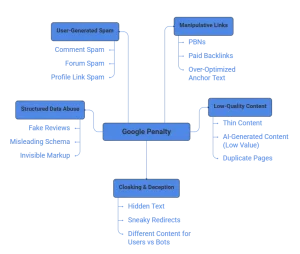
Image Source: Created using Napkin AI.
1. Manipulative Link Building
This remains the single most common trigger for a manual action penalty. Despite years of Google warnings, many sites still engage in link buying, private blog network (PBN) usage, or reciprocal link exchanges at scale. In 2026, Google’s SpamBrain is highly effective at detecting these patterns, even when they are disguised across multiple domains and IP addresses.
Over-optimised anchor text is also a red flag. If the majority of your backlinks use exact-match keywords as anchor text rather than natural, branded, or varied anchors, your link profile will appear artificial to Google’s detectors.
2. Thin, Duplicate, or Mass AI-Generated Content
The rise of AI content tools has made it easier than ever to produce large volumes of text quickly but it has also made thin content penalties more common. Google does not penalise AI-generated content by default, but it does penalise content that lacks original insight, expertise, and genuine helpfulness regardless of how it was produced.
Scraped content, duplicate pages without canonical tags, doorway pages designed to rank for specific terms, and auto-generated category or tag pages with no real content are all common triggers under both Panda and the Helpful Content system.
3. Cloaking and Hidden Text
Showing Googlebot one version of a page while serving real users a different version is a direct violation of Google’s core policies. Similarly, stuffing keywords into white text on a white background, or hiding them behind images, is the kind of deceptive technique that triggers immediate manual review if flagged.
4. Misuse of Structured Data
Schema markup is a powerful SEO tool when used correctly, but marking up content that does not exist on the visible page such as fake review ratings, misleading product information, or invisible structured data, violates Google’s rich results guidelines and can result in a manual action specifically targeting structured data abuse.
5. User-Generated Spam
If your site has a comments section, a community forum, or user profile pages, it is your responsibility to moderate them. Large volumes of spammy links in UGC areas can attract a manual action penalty even if the rest of your content is entirely clean.
How to Check If Your Site Has a Google Penalty
Before you can fix a problem, you need to confirm exactly what you are dealing with. Here is a systematic process for diagnosing a google penalty.
| Symptom | Likely Cause | Penalty Type |
|---|---|---|
| Sudden traffic drop overnight | Algorithm update | Algorithmic |
| GSC manual action alert | Policy violation | Manual |
| Specific pages lost rankings | Thin content / spam | Partial penalty |
| Entire site disappeared | Severe spam / cloaking | Site-wide manual |
| Rankings dropped after backlink spike | Toxic links | Penguin |
Step 1: Check Google Search Console for Manual Actions
Log into Google Search Console and navigate to Security & Manual Actions in the left sidebar. If a manual action has been applied to your site, you will see it listed here along with a description of the violation, the pages affected, and a link to Google’s documentation. If this section shows “No issues detected,” your problem is most likely algorithmic rather than a formal manual action.
Step 2: Analyse Traffic in Google Analytics or GA4
Pull your organic traffic data and look for sudden, sharp drops on specific dates. Cross-reference these dates with Google’s confirmed algorithm update history (available through resources like Moz’s Google Algorithm Change History or Search Engine Roundtable). If your traffic dropped within a day or two of a confirmed update, that algorithm component is almost certainly the cause.
Step 3: Run a Comprehensive Backlink Audit
Use tools such as Ahrefs, SEMrush, or Google Search Console’s own Links report to review your backlink profile. Look for a high volume of links from low-quality or irrelevant domains, links with overly optimised anchor text, and sudden spikes in referring domains that coincide with your traffic drop. Export a full list of referring domains and flag any that appear spammy, irrelevant, or purchased.
Step 4: Audit Your Content Quality
Use a site crawler such as Screaming Frog or Sitebulb to identify thin pages, duplicate content, pages with low word counts, and any auto-generated or templated pages that offer no unique value. Check your coverage report in Search Console for pages that have been excluded from the index. It can reveal whether Google has already started devaluing sections of your site.
How to Recover from a Google Penalty
Recovery is absolutely achievable, but it requires a methodical approach. Cutting corners at this stage is the most common reason sites fail to recover. Here is exactly how to recover from each type of google penalty.
Recovering from a Manual Action Penalty
Manual action recovery follows a defined process:
- Identify the exact violation. Read the manual action notice in Search Console carefully. It will specify the type of violation and whether it is site-wide or partial.
- Fix the root cause completely. Do not just clean up surface-level symptoms. If the penalty is for unnatural links, you need to identify every problematic link. If it is for thin content, you need to rewrite or remove the offending pages.
- Document every change you make. Google’s review team expects to see evidence of the work you have done. Maintain a detailed log of all changes, link removal outreach emails sent, and content improvements made.
- Submit a Reconsideration Request via Search Console. Be specific, transparent, and thorough. Acknowledge the violation, explain what caused it, describe every remediation step taken, and attach your disavow file if applicable. Vague or defensive requests are almost always rejected.
- Wait for Google’s response. Manual action reviews typically take two to six weeks. You will receive a notification in Search Console once a decision has been made.
Recovering from an Algorithmic Penalty
There is no reconsideration request for algorithmic issues, recovery here is entirely dependent on fixing the underlying problems and waiting for Google’s algorithms to reassess your site.
- For Penguin (link-based): Conduct a full backlink audit, reach out to webmasters to request removal of toxic links, then submit a disavow file for links you cannot get removed. Build high-quality backlinks, editorially earned links over time to improve your overall link profile health.
- For Panda and Helpful Content: Rewrite thin or unhelpful content to add genuine depth, original insight, and clear expertise. Add author bios and credentials where relevant to strengthen E-E-A-T signals. Consolidate multiple thin pages into comprehensive, well-researched resources. Remove or noindex pages that cannot be improved.
Algorithmic recovery is confirmed at the next algorithm refresh or core update, which can take weeks or months. Be patient and monitor your GSC performance report weekly for gradual improvements.
How to Use the Google Disavow Tool
The disavow tool allows you to tell Google to ignore specific backlinks when assessing your site. It should only be used when you have exhausted manual outreach efforts and still have toxic links pointing at your domain.
Your disavow file must be a plain text file formatted with one URL or domain per line, prefixed with “domain:” for domain-level disavows. Once prepared, submit it through Google Search Console’s Disavow Links tool, found under the Index section.
Tools for Penalty Recovery
| Task | Recommended Tools |
|---|---|
| Backlink audit | Ahrefs, SEMrush |
| Technical audit | Screaming Frog, Sitebulb |
| Traffic analysis | Google Analytics (GA4) |
| Penalty check | Google Search Console |
| Disavow submission | Google Disavow Tool |
Penalty Prevention: How to Keep Your Site Safe in 2026
The best strategy for dealing with a google penalty is ensuring you never receive one in the first place. Here is how to keep your site protected going forward.
- Follow Google’s Search Essentials strictly. Read them annually, they evolve, and what was acceptable two years ago may not be today.
- Audit your backlink profile every quarter. Use Ahrefs or SEMrush to monitor for new toxic links and flag them before they accumulate.
- Produce people-first content aligned with E-E-A-T. Every piece of content you publish should demonstrate real experience, clear expertise, genuine authority, and trustworthiness.
- Avoid any “shortcut” SEO tactics. If a service or tool promises fast rankings through bulk links or scaled AI content, it is almost certainly a risk to your domain.
- Monitor Search Console weekly. Set up email alerts for manual action notifications and check the Performance report for any unexplained traffic drops.
- Maintain a clean technical SEO foundation. Ensure proper canonicalisation, fix broken redirects, validate structured data with Google’s Rich Results Test, and keep your Core Web Vitals scores healthy.
- Moderate user-generated content actively. Use nofollow attributes on UGC links and implement spam filtering on comments and forum posts.
Conclusion
A Google penalty is serious, but it does not end your website’s growth. Many websites recover successfully when you identify the root cause and fix it with a structured approach. You need to act methodically diagnose the issue accurately, apply complete fixes, document every step, and give Google time to reassess your site. This guide explains that penalties can be manual or algorithmic, often caused by manipulative links, low-quality content, technical misuse, or spam signals. To recover, you must clean up backlinks, improve content quality, resolve technical issues, and submit a reconsideration request when required. More importantly, you should focus on prevention. Run regular SEO audits, follow ethical link-building practices, and create people-first content to protect your site from future risks.
Dealing with a penalty can feel overwhelming, especially when it affects your traffic and revenue. Tangence supports businesses with end-to-end SEO services, including penalty audits, backlink cleanup, content optimization, and technical SEO improvements. If you want to recover your rankings and build a stronger, penalty-proof website, now is the time to take action.
Frequently Asked Questions
Q1: How do I know if my site has a Google penalty?
Check the Manual Actions section in Google Search Console. If you don’t see any issues there but notice a sudden drop in traffic, an algorithmic update has likely impacted your site instead of a manual penalty.
Q2: How long does it take to recover from a Google penalty?
You can typically recover from manual penalties within 2–6 weeks after submitting a successful reconsideration request. Algorithmic penalties usually take longer often several months because recovery depends on Google’s next update cycle.
Q3: Can a Google penalty cause my site to be completely deindexed?
Yes, Google can completely deindex your site if it detects severe violations like pure spam or cloaking. However, most penalties affect only specific pages rather than the entire website.
Q4: Does a google penalty affect all pages or just some?
It depends on the penalty type. Manual actions can be site-wide or partial (affecting a specific section). Algorithmic filters like Panda often affect entire sites if the content quality issue is widespread.
Q5: Should I use the disavow tool to remove a google penalty?
Only for link-based manual actions or suspected Penguin-related ranking drops. Disavowing safe links can actually hurt you. Always conduct a thorough backlink audit first.
Q6: Will rebuilding my website remove a google penalty?
Not automatically. Migrating to a new domain to escape a penalty is a violation of Google’s policies and can transfer the penalty. Fix the root cause on your existing site.
Q7: Can good content alone recover my site from a google penalty?
Content improvements help with Panda and Helpful Content-related penalties, but link-based penalties also require backlink cleanup and a formal disavow. A full SEO audit is the best starting point.