-01.svg)
-02.svg)
-03.svg)
-04.svg)
-05.svg)
-06.svg)
-07.svg)
-08.svg)
-09.svg)
-10.svg)
-11.svg)
-12.svg)
-13.svg)
-14.svg)






blog
What is Keyword Cannibalization & How to Fix Competing Pages

You have spent months building out your blog. You have written multiple posts about the same topic, each one carefully crafted, each one well-intentioned. And yet, your rankings are stuck, your traffic is flat, and your best page refuses to climb. The culprit? Keyword cannibalization.
Keyword cannibalization happens when two or more pages compete for the same search query. Instead of one strong page dominating, Google must choose between several weaker ones. It often picks the wrong one. Knowing how to fix keyword cannibalization is one of the highest-impact SEO tasks you can perform. It is surprisingly common, even on well-maintained websites.
| Symptom | What It Usually Means |
|---|---|
| Rankings keep fluctuating | Google can’t decide which page to rank |
| Multiple URLs for same keyword | Content overlap / keyword duplication |
| Low CTR despite impressions | Clicks are getting split across pages |
| Traffic not growing | New content is cannibalizing existing pages |
If you are noticing any of these signs, your site may already be dealing with keyword cannibalization, let’s break it down.
In this guide, you will learn what keyword cannibalization is. You will learn how to detect it using free and paid tools. Most importantly, you will learn how to fix keyword cannibalization using six proven strategies.
What is Keyword Cannibalization?
Keyword cannibalization is an SEO issue that occurs when multiple pages on the same domain target the same or closely overlapping keywords, causing them to compete with each other in search engine results pages (SERPs). Rather than consolidating your site’s authority behind a single, powerful page, your ranking signals are diluted across several URLs and the result is that none of them rank as well as they could.
Think of it like this: imagine two salespeople from the same company pitching to the same client, each offering slightly different versions of the same product. Instead of one clear, confident pitch winning the deal, both leave the client confused and the competitor next door walks away with the contract. That is precisely what happens in Google’s index when your own pages undercut each other.
How Keyword Cannibalization Happens
Cannibalization rarely happens by design. It typically creeps in over time as a site grows. Common causes include:
- Publishing multiple blog posts that cover the same topic from slightly different angles without differentiating their search intent
- Category or tag archive pages that rank for the same terms as your primary blog posts
- Product pages and collection pages that share identical or nearly identical keyword targets
- Old content that was never updated or redirected after a newer, better page was published
- A lack of a documented keyword map meaning no one on the team knows which URL owns which keyword
Why This Confuses Google
Search engines evaluate hundreds of relevance signals to decide which page best matches a query. When two pages on the same domain send identical signals, similar title tags, overlapping body content, the same anchor text from internal links – Google cannot confidently determine which one deserves the top position. It may alternate between them across crawls, splitting impressions, clicks, and link equity in a way that benefits neither page. The result is consistently mediocre rankings where you could have one excellent one.
Signs You Have a Keyword Cannibalization Problem
Before you can fix a cannibalization issue, you need to recognize it. Here are the most reliable signals that two or more of your pages are competing for the same search query:
- Fluctuating rankings: A page ranks at position 5 one week and drops to position 18 the next, without any obvious off-site reason. Google is alternating between two of your URLs.
- Split click-through rates: In Google Search Console, you notice two different URLs appearing in the performance report for the same query – each getting a fraction of the impressions the single page should be earning.
- Declining organic traffic despite publishing more content: New posts are going live, but your overall traffic is flat or falling. New content is cannibalizing existing pages instead of expanding reach.
- Thin content scores on multiple pages: Neither of two competing pages has enough unique substance to stand out, because the content is effectively split between them.
- Inconsistent internal linking: Different pages across your site use the same keyword anchor text pointing to different URLs – sending mixed authority signals to search engines.
How to Identify Keyword Cannibalization (Tools & Methods)
| Method | Tool Type | How It Works | What to Look For | SEO Insight |
|---|---|---|---|---|
| Google Search Console | Free | Go to Performance → Search Results, filter by a specific query, and check the Pages tab | Multiple URLs ranking for the same query, shared impressions, low average position | Indicates Google confusion about which page to rank |
| Site Search Operator | Free | Use: site:yourdomain.com "keyword" in Google search |
More than one relevant page appearing for the same keyword | Quick way to spot duplicate keyword targeting |
| Ahrefs Site Explorer | Paid | Check Organic Keywords report and export keyword data | Same keyword ranking across multiple URLs | Helps identify overlapping rankings at scale |
| Semrush Cannibalization Report | Paid | Use Position Tracking → Cannibalization Report | Automatically highlights keyword conflicts | Best for automated detection of cannibalization issues |
| Screaming Frog SEO Spider | Paid (Freemium) | Crawl your website and export title tags & meta descriptions | Similar or duplicate titles and metadata | Reveals on-page duplication signals |
| Keyword Mapping Spreadsheet | Free | Create columns: URL, Primary Keyword, Secondary Keywords | Same keyword appearing across multiple URLs | Best manual method to audit and prevent cannibalization |
How to Fix Keyword Cannibalization: 6 Proven Strategies
Once you have identified which pages are competing, it is time to resolve the conflict. The right fix depends on the authority, content quality, and backlink profile of each page. Here are six strategies for how to fix keyword cannibalization effectively starting with the most powerful.
Strategy 1: Consolidate and Merge Competing Pages
This is the most impactful fix for how to fix keyword cannibalization when both competing pages cover similar ground but neither is comprehensive on its own. Combine them into a single, authoritative piece that covers the topic more thoroughly than either page did individually.
Before merging, check the backlink profiles of both pages using Ahrefs or Semrush. Keep the URL that has more referring domains as your canonical destination. Move all unique content from the weaker page into the stronger one, then set up a 301 redirect from the old URL to the new one. Update all internal links across the site to point to the surviving page.
- Keep the URL with the stronger backlink profile
- Import all unique sections, data points, or media from the weaker page
- 301 redirect the old URL permanently
- Submit the updated sitemap in Google Search Console
Strategy 2: Set Up 301 Redirects
When one page clearly outperforms the other – more traffic, more backlinks, more engagement, the fastest fix is a permanent 301 redirect from the weaker URL to the stronger one. This consolidates PageRank, signals a clear preference to Google, and eliminates the split-authority problem in one move.
After implementing the redirect, monitor Google Search Console for four to six weeks. Watch for the surviving page’s average position and click-through rate to improve as Google recrawls and consolidates the ranking signals.
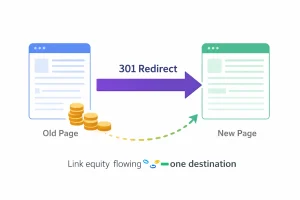
| A 301 redirect consolidates multiple competing pages into one strong page, helping transfer link equity and improve search rankings. |
Strategy 3: Use Canonical Tags
For pages that must remain live for functional or business reasons such as e-commerce product variants, regional landing pages, or filtered category pages, the rel=”canonical” tag tells Google which version is the primary one to index and rank.
Add the canonical tag to the head of the secondary pages, pointing to the primary URL. Remember: canonical is a strong hint, not an absolute directive. Google may choose to ignore it if the pages are significantly different in content. Pair canonicals with consistent internal linking to reinforce the signal.
Strategy 4: Re-optimize and Differentiate Content
Sometimes you do not need to delete or redirect anything, you just need to make each page clearly distinct in both content and intent. This is especially effective when two pages target related but genuinely different audiences or stages of the buyer journey.
- Assign truly unique focus keywords to each page, avoid synonyms that carry the same search intent
- Shift one page from informational intent to transactional (or vice versa) by rewriting the CTA, restructuring the content, and targeting different long-tail variations
- Add unique data, case studies, or multimedia that the competing page does not have
- Update title tags and meta descriptions to clearly differentiate the angle of each page
Strategy 5: Fix Your Internal Linking Strategy
Internal links are one of Google’s strongest signals for determining which page on a domain is the most authoritative version for a given keyword. If different pages across your site link to different URLs using the same anchor text, you are actively splitting your authority signal.
Audit your internal links using Screaming Frog or Ahrefs. Find every instance where a keyword anchor is pointing to a non-canonical URL and update it to point to your chosen winner. This is one of the fastest ways to signal page authority without touching external backlinks and it is often overlooked when discussing how to fix keyword cannibalization.
Strategy 6: Delete or Noindex Low-Value Pages
If a page has zero organic traffic, zero backlinks, and thin content that adds nothing unique, removal may be the right call. A smaller, tighter site with strong, comprehensive pages almost always outperforms a bloated site full of redundant content.
For pages that serve a user experience purpose but should not rank, such as filtered product listings, internal search result pages, or printer-friendly versions add a noindex meta tag. This removes them from Google’s index without breaking internal functionality.
- Delete: zero traffic, zero backlinks, thin and redundant content
- Noindex: functional pages that must stay live but should not rank
- Always monitor crawl budget after removing or noindexing multiple pages
How to Prevent Keyword Cannibalization Going Forward
Fixing existing cannibalization is only half the battle. Without a prevention system in place, new competing pages will emerge as your content library grows. Here is how to stay ahead of the problem.
Build a Keyword Map and Stick to It
A keyword map is a living document that assigns one primary keyword and one URL to every topic you plan to cover. Before any new content goes live, the writer or editor checks the map to confirm the target keyword is not already assigned to an existing page. This single habit eliminates most cannibalization before it starts.
Use a Topic Cluster Model
Organize your content into topic clusters: one comprehensive pillar page covers a broad topic, while multiple supporting posts target specific long-tail variations. Each supporting post links back to the pillar. This structure makes it structurally impossible for the pillar and its spokes to cannibalize each other because their keyword targets are explicitly differentiated at the planning stage.
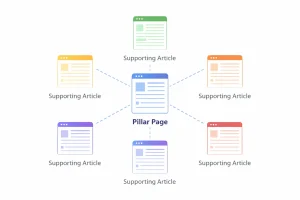
| A topic cluster model showing how one pillar page and supporting articles work together to prevent keyword cannibalization and strengthen SEO authority. |
Conduct Quarterly SEO Content Audits
Even with a keyword map in place, cannibalization can creep back in over time, especially on sites with multiple contributors. Schedule a quarterly audit using Google Search Console and Ahrefs to catch new instances of competing pages before they have a chance to suppress your rankings.
- Quarterly GSC review: filter for queries with multiple ranking URLs
- Annual content consolidation: merge or prune pages that have become redundant
- Pre-publish checklist: require a cannibalization check before any new post goes live
Conclusion
Keyword cannibalization is not a niche technical issue, it is one of the most common reasons well-written content fails to rank at its full potential. When your own pages compete against each other, you are essentially dividing your SEO authority by two, three, or more, handing positions to competitors who have their content architecture in order.
If auditing, merging, redirecting, and restructuring an entire site’s worth of content sounds like more than your team can take on alongside daily business operations, you do not have to tackle it alone. Tangence offers end-to-end SEO services designed to do exactly this.
Our team works with businesses across industries to eliminate keyword conflicts, sharpen content architecture, and build the kind of search presence that compounds over time. If you are ready to stop leaving rankings on the table, reach out to Tangence today for a tailored SEO audit and a clear roadmap to fix your competing pages for good.
Frequently Asked Questions
Q1. What is keyword cannibalization in SEO?
Keyword cannibalization happens when multiple pages on the same website target the same or very similar keywords. This creates internal competition, making it harder for search engines to determine which page should rank, often resulting in lower rankings for both.
Q2. How do I know if my website has keyword cannibalization?
You can identify it using Google Search Console by checking if multiple URLs rank for the same query. Other signs include fluctuating rankings, low CTR despite impressions, and different pages swapping positions in search results.
Q3. Is keyword cannibalization always harmful?
Not always. It can be beneficial if pages target different search intents. However, when intent overlaps, it dilutes authority and negatively impacts SEO performance.
Q4. Should I delete or redirect cannibalized pages?
It depends on value. Merge and redirect if both pages have useful content, redirect if one is weaker, and delete only if the page has no traffic or backlinks.
Q5. How long does it take to fix keyword cannibalization?
It typically takes 2–8 weeks for rankings to stabilize after fixes like redirects, content updates, or canonical tags.
Q6. Can internal linking fix keyword cannibalization?
Internal linking helps signal the primary page, but it should be combined with other fixes like content consolidation or re-optimization.
Q7. What tools are best for detecting keyword cannibalization?
Google Search Console is the best free option, while Ahrefs, Semrush, and Screaming Frog provide deeper analysis for larger websites.